
Master Maintenance of Data for Drone Operations
By Friday afternoon, the flying is done, but the admin mess is just starting. Flight logs sit on a controller, imagery is spread across SD cards, battery cycles live in someone's spreadsheet, and the maintenance note about a cracked prop is buried in a chat thread. When that happens for one week, you can recover. When it becomes your normal workflow, small data problems start turning into operational ones.
That's where the maintenance of data stops being an IT topic and becomes an operations discipline. In drone work, bad data doesn't stay neatly inside a folder problem. It spills into compliance checks, client reporting, maintenance planning, and quoting future jobs. If a flight record is incomplete, a maintenance interval can be missed. If imagery is mislabeled, the wrong deliverable gets sent. If logs and asset records don't line up, your audit trail gets shaky fast.
The teams that stay in control usually don't clean things up with occasional heroic effort. They build a repeatable system, then make that system hard to break.
Why Your Drone Data Needs a System
Most drone operators don't lose control of data all at once. It happens gradually. A pilot renames files manually in the field. Someone skips a maintenance entry because they're rushing to the next job. A client deliverable gets copied into the wrong project folder. Then a month later, nobody can tell which flight log matches which set of images.
That's where the actual issue lies. Disorder compounds. It makes routine work slower and high-stakes work riskier. A compliance review takes longer because records aren't tied together cleanly. A project manager underquotes the next job because the historical flight time wasn't captured accurately. A client asks for supporting files and your team spends half a day reconstructing what should have been obvious.
Start with structure, not cleanup
If your current process depends on people remembering where things belong, it's fragile. The first fix is simple and boring. Define a standard structure for every project and use it every time.
A workable base looks like this:
- Client level folders for contracts, contact records, and long-term account documents
- Project folders for each job, site, or survey campaign
- Flight record folders for logs, permissions, risk documents, and field notes
- Asset folders for maintenance history, battery records, and repair evidence
- Deliverable folders for edited outputs, approvals, and final exports
The naming standard matters just as much as the folder tree. If two pilots name the same type of file in different ways, search breaks down quickly. Keep it predictable. Date first, then client, then project, then flight or asset reference, then file type.
Practical rule: If a new team member can't identify a file without opening it, the naming convention isn't good enough.
For connected operations, the same principle applies beyond storage. If aircraft, controllers, apps, and reporting tools don't feed a shared operational model, you end up maintaining fragments instead of records. That broader challenge shows up clearly in work on building robust connected products, where device data only becomes useful when the system around it is designed to handle it consistently.
A strong data system also makes later analysis possible. If you want useful reporting on utilization, maintenance, client profitability, or compliance readiness, you need clean inputs from the start. A practical guide to drone data analysis and management becomes relevant at this stage. Analysis is only as good as the data-maintenance habits behind it.
Building Your Data Organization Framework
Good organization for drone operations has to match the way field work happens. A generic company filing system won't do that. Drone teams collect different kinds of records at different speeds, through different devices, often in imperfect conditions. Your framework needs to absorb that reality without producing chaos.
Build around operational objects
Don't organize data only by date or only by client. That works until you need to answer a practical question like: when was this battery last used on revenue work, or which flights relate to this inspection asset, or where are the compliance files for this one site?
A better framework uses a few operational anchors:
-
Client Long-lived relationship data belongs here. Contracts, billing references, standing procedures, and client-specific access permissions.
-
Project or site This is the working layer. Scope documents, risk paperwork, approvals, maps, imagery, and output files should stay tied to the actual job.
-
Aircraft and equipment Maintenance history, firmware notes, battery usage, and repair records need their own consistent home.
-
People Pilot certifications, training records, and role-based permissions shouldn't be mixed into project folders.
That separation sounds obvious, but teams often blur these categories. When they do, one file ends up trying to serve three purposes and serving none of them well.
Use one naming convention everywhere
The maintenance of data gets easier when every record follows the same grammar. A practical format is:
YYYYMMDD_Client_Project_FlightID_DataType.ext
That won't fit every file perfectly, and that's fine. The point is consistency, not elegance. Dates should stay in one standard format. IBM recommends consistency measures such as ISO 8601 dates, alongside standard naming conventions, as part of maintaining data quality over time in areas like accuracy, completeness, consistency, and timeliness. IBM also notes that timeliness means keeping data current through incremental updates, scheduled refreshes, or real-time streaming in a continuous process, not a one-off cleanup (IBM on data quality pillars and timeliness).
Use the same logic for asset names. If one pilot records an aircraft as M3E-01 and another writes Mavic3Eagle, you've created duplicate identities before analysis even starts.
Make metadata do the heavy lifting
Folders and filenames aren't enough for drone work because so much value sits inside the context around a file. You want imagery tied to site, pilot, flight date, aircraft, payload, and project status. You want logs linked to the mission and asset. You want maintenance entries tied back to actual usage.
That handoff from physical collection to digital structure is where many teams stumble. The card gets copied, but the context doesn't. The files arrive, but they aren't operationally usable.
A platform with direct sync matters because it reduces that break between field capture and office recordkeeping. Instead of asking pilots to transfer, rename, categorize, and re-enter core details by hand, you want the ingest path to preserve context automatically. If you're designing that kind of operating model, this guide to a drone data management program is useful because it frames organization as a system, not a folder exercise.
The strongest framework is the one your team can follow when they're tired, wet, rushed, and already late to the next site.
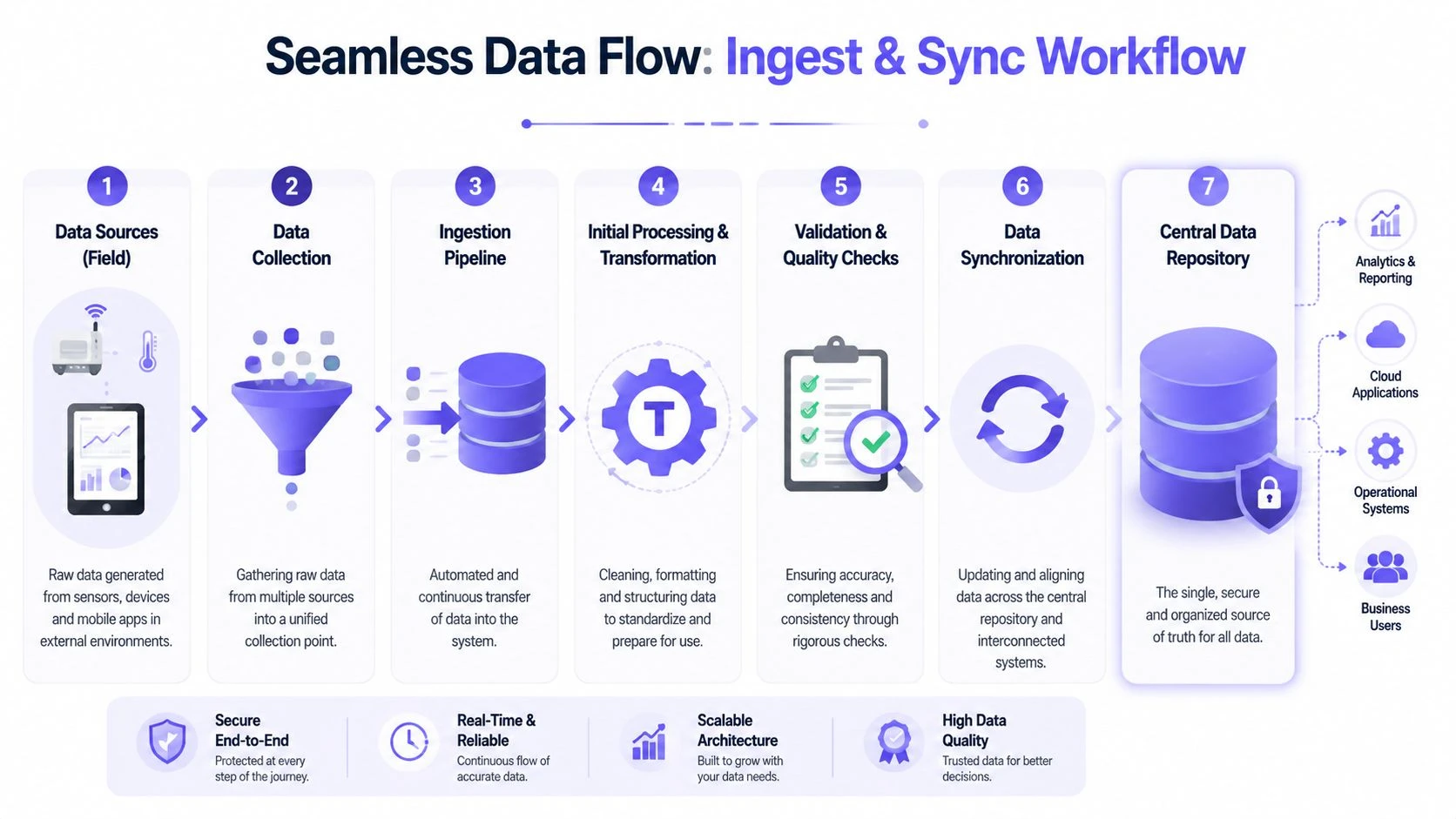
Creating Seamless Data Ingest and Sync Workflows
The most error-prone moment in drone data handling is the handoff after the flight. Field data leaves the aircraft, controller, mobile device, or SD card and enters your central system. If that transfer depends on memory and manual discipline, quality drops quickly.
That's why ingest isn't just a file-copying task. It's the point where records either become trustworthy or start drifting.
What usually breaks in the handoff
Manual transfer creates a familiar set of problems:
- Incomplete capture because some logs stay on one device while imagery is copied elsewhere
- Duplicate records when files are imported twice under slightly different names
- Timestamp confusion when systems use inconsistent date and time formats
- Missing context because pilots know what happened, but the system never receives that knowledge
- Delayed updates that leave maintenance records and flight history out of sync
Those aren't abstract data issues. They affect billing, asset health tracking, incident reconstruction, and compliance reporting.
Amplitude describes a thorough workflow as a closed loop: document the data dictionary and ownership, validate at input, profile for missingness, duplicates, and outliers, reconcile against source-of-truth records, standardize formats and units, and run recurring audits. It also notes that the biggest operational wins tend to come from automation in data-entry validation, duplicate detection, and rule-based flagging because manual cleaning is time-intensive, error-prone, and temporary (Amplitude on closed-loop data cleaning workflows).
What good ingest looks like
For drone operations, a strong ingest workflow should do three things without relying on memory:
| Workflow need | What it means in practice |
|---|---|
| Capture | Pull logs, imagery references, and asset usage records from the source system consistently |
| Normalize | Convert names, formats, timestamps, and identifiers into one standard |
| Route | Attach each record to the correct project, asset, pilot, and compliance context |
A system like Dronedesk fits here because it can act as the operational hub that receives synced flight information and ties it to jobs, assets, and reporting, rather than leaving those records scattered across separate tools and manual notes.
Build for exceptions, not ideal days
Pilots don't need a process built for quiet office conditions. They need one that still works after a long field day. That means fewer manual steps and better controls at the point of entry.
Focus on these checks:
- Flight completeness. Every mission should have a matching flight record, not just imagery files.
- Asset linkage. Aircraft, battery, and pilot records should connect to the same operation.
- Time consistency. Standardized timestamps prevent broken sequences and reporting errors.
- Project assignment. Data should land in the right operational container on ingest, not after a later cleanup.
A single source of truth only exists if the same event isn't being recorded differently in three places.
If you're tightening this part of the workflow, a practical companion is this overview of data integration best practices for connected systems. The core lesson applies directly to drone ops. Integration quality determines reporting quality.
Implementing Data Quality and Validation Checks
A drone team can collect every flight log, photo set, maintenance note, and permit on time and still end up with unusable records. The failure usually happens in the gaps. A pilot selects the wrong aircraft. An upload drops mid-sync. A maintenance action gets logged in a spreadsheet instead of the asset record. By the time someone notices, the bad data has already fed a client report, a maintenance decision, or a compliance file.
Validation needs to sit inside day-to-day operations. It needs to catch problems while the job is still fresh and the person who flew it can fix the record quickly.

Check quality in operational terms
Generic data advice usually stops at databases and dashboards. Drone operations need a stricter standard because the record has to stand up to maintenance planning, client delivery, and compliance review.
The practical quality lenses are straightforward:
- Accuracy. The pilot, aircraft, battery, location, and project match what happened in the field.
- Completeness. The record includes the fields and attachments needed to reconstruct the operation later.
- Consistency. Dates, asset names, statuses, and identifiers follow one format across every job.
- Timeliness. Records are submitted and synced fast enough to support maintenance decisions and reporting.
- Relevance. Teams capture information that supports operations, safety, billing, and compliance, not extra fields nobody uses.
Dronedesk helps here because it gives teams one operational system for flights, assets, documents, and reporting. That matters. Validation works better when the platform can check relationships between records instead of leaving staff to compare spreadsheets, SD cards, and pilot notes by hand.
Validate the records that create risk if they are wrong
Not every field deserves the same scrutiny. Start with the records that affect airworthiness, compliance, client output, and traceability.
A practical validation checklist looks like this:
-
Flight logs exist for every mission
Every planned or completed operation should have a matching record, not just imagery files on a memory card. -
Flight duration and timestamps are plausible
Start time, end time, and duration should align with the mission window and asset usage history. -
GPS, altitude, and imagery metadata are present where required
Missing metadata weakens mapping, inspection, and proof-of-work records. -
Aircraft, battery, and pilot IDs match approved records
Free-text entries create duplicates and break maintenance and compliance tracking. -
Maintenance actions connect to the correct asset history
An inspection logged outside the asset record is easy to miss later. -
Required compliance artifacts are attached to the job
Risk assessments, permissions, checklists, and supporting documents need record-level linkage.
NetSuite makes the broader point well in its guidance on recurring data errors. Teams should check completeness, uniqueness, consistency, validity, accuracy, and timeliness before analysis, then revisit those checks regularly because the same failures return if nobody owns the process (NetSuite on common data mistakes and recurring quality review).
Build checks into the workflow, not the cleanup
The weak version of validation happens at the end of the month, usually when someone is trying to build a report in a hurry. By then, missing links and bad entries are harder to fix because the job details are no longer fresh.
The stronger approach is point-of-entry validation. Require standard asset IDs. Flag missing attachments before a mission can be closed. Surface duplicate aircraft names. Alert the team when a maintenance event does not match flight usage. In Dronedesk, that kind of structure reduces the amount of detective work operations managers have to do later.
I have found that one rule improves data quality faster than any training session: if a record cannot support a maintenance decision or defend a flight during an audit, it is not complete.
Validation and backup solve different problems
Clean data still needs protection. Backups do not confirm whether a flight record is accurate or whether a maintenance note is linked to the right aircraft. They only preserve a copy of what you have.
That is why validation and recovery planning need to work together. If you want to ensure data recovery for your business, keep backup strategy separate from quality control and run both as standard operating practice.
Field lesson: If a pilot can finish a job without attaching the required compliance record, the process is relying on memory instead of system control.
Good validation keeps bad records from spreading into reports, maintenance histories, and compliance files. That saves more time than any cleanup exercise later.
Designing Robust Backup and Recovery Plans
Drone teams usually think about backup after they lose something important. By then, the conversation is about damage control instead of resilience. That's expensive, stressful, and avoidable.
The weak version of backup is common. Someone copies project files to an external drive now and then and assumes the problem is solved. It isn't. Drone operations generate logs, imagery, maintenance documents, and compliance files across multiple devices and services. If you only protect one copy in one place, recovery depends on luck.

Build a recovery plan, not just a backup habit
Dataversity highlights the broader problem well. Software failures can damage data integrity, and a gap often exists between backup thinking and incident readiness. In data cited there, 30.2% of technology leaders ranked essential backup as the top prevention step, while only 1.2% cited incident response plans. The same piece also reports that in 2025, 67.7% of businesses experienced significant data loss (Dataversity on data integrity issues and preparedness gaps).
For drone operations, the implication is straightforward. Data moves between aircraft, controllers, mobile apps, cloud platforms, local storage, and client delivery systems. So your plan has to protect data across the movement, not only at the final destination.
A practical recovery setup
Use the 3-2-1 rule as your minimum standard:
-
Three copies Keep the working copy plus two backups.
-
Two media types For example, local storage and cloud storage.
-
One off-site copy This protects you from theft, fire, device failure, or office loss.
A simple way to apply that in drone work:
| Layer | Purpose | Typical content |
|---|---|---|
| Primary operational store | Daily access and active jobs | Flight logs, active imagery, maintenance updates |
| Local backup | Fast restore for common failures | Recent projects, current asset records |
| Off-site backup | Disaster recovery | Full archive, compliance records, historical projects |
Local backup is faster to restore from. Cloud backup is better protection against physical loss. Organizations frequently need both.
Test restores or don't trust the plan
A backup that hasn't been tested is a theory. Run periodic restore tests on a real project folder, a set of logs, and an asset record history. Check whether permissions, metadata, and file relationships survive the restore. If they don't, your backup may be preserving files while destroying usability.
If you're reviewing off-site strategy in more detail, this walkthrough on how to ensure data recovery for your business is useful as a planning reference because it pushes the conversation beyond simple file copies toward recoverability.
Establishing Security Retention and Purge Policies
Good data maintenance doesn't end with storage and backup. You also need rules for access, retention, and deletion. Without them, teams keep everything forever, share too much internally, and create a bigger compliance and security problem than they started with.
Limit access by role
Not everyone needs to see everything. In drone operations, that's especially important because your records often mix client information, site details, maintenance history, internal notes, and compliance artifacts.
Role-based access works because it matches how teams operate:
- Pilots need their assigned flight records, asset check information, and relevant project docs.
- Operations managers need broader visibility across jobs, equipment, and team activity.
- Clients may need access to final deliverables and selected project records, but not your internal maintenance or fleet history.
- Finance or admin staff may need billing and job references without operational detail.
Keep permissions narrow by default. Expand only when there's a clear operational reason.
Retain intentionally
Retention is where many teams become inconsistent. They either keep too little and regret it later, or keep too much and can't manage the sprawl. A practical retention policy should reflect operational value, compliance needs, contractual obligations, and storage cost.
Here's a simple model you can adapt.
| Data Type | Recommended Retention Period | Reason |
|---|---|---|
| Flight logs | Long enough to support compliance, incident review, and operational history | These records support traceability and trend analysis |
| Maintenance records | Long enough to preserve full asset history while the asset remains in service and beyond disposal where required | Repair and inspection history affects safety and resale documentation |
| Battery usage records | Long enough to monitor lifecycle, usage patterns, and maintenance decisions | Battery health depends on historical use context |
| Raw imagery | Based on client contract, project value, and rework risk | Reprocessing or dispute resolution may require original files |
| Final deliverables | Long enough to meet client expectations and support repeat work | Clients often request past outputs again |
| Pilot certifications and training records | Long enough to demonstrate competence and internal oversight | These records support staffing and governance decisions |
| Permissions, risk assessments, and compliance artifacts | Long enough to evidence operational due diligence | These documents support reviews and investigations |
| Temporary exports and duplicate transfers | Short retention, then purge | They add clutter and increase unnecessary exposure |
Purge with control, not guesswork
Deleting data should be a policy action, not an ad hoc cleanup. Define who can approve deletion, what gets logged, and what must be checked first. If records are linked to an active dispute, compliance review, or asset investigation, they shouldn't be purged casually.
The overlooked issue here is fairness in what your data represents over time. Reporting can become distorted if some operators, regions, or use cases are repeatedly under-recorded. Coverage on equitable data has warned that using only the data already collected can hide important parts of society and leave underserved groups out of decision-making (Nextgov on the need for more equitable data). In drone operations, the same principle applies operationally. If your retention and collection habits systematically drop certain job types or field teams from the historical record, your planning and risk models become skewed.
Automating Audits Compliance and Monitoring
A drone operation usually discovers its weak spots during a client query, an insurance request, or a regulator asking for evidence from six months ago. If your answer depends on searching inboxes, shared drives, and pilot notes, the process is already failing. Audits should be a routine output of the system, not a scramble.
Automation matters here because drone data sprawls across flight logs, maintenance records, imagery, airspace approvals, and client deliverables. Each record has a different owner, a different retention rule, and a different compliance risk. A platform like Dronedesk helps by keeping those records connected, time-stamped, and easier to review in one place.
Monitor the health of the system
Track a short list of indicators that show whether operational records are staying usable:
- Maintenance events with all required fields completed
- Duplicate asset records
- Time since the last inspection record for each aircraft
- Records passing validation rules
- Project files missing linked flight evidence
These checks work because they focus on operational failure points, not generic database hygiene. In drone teams, missing serial numbers, unlinked flight evidence, or stale maintenance records create real exposure during an audit. Monte Carlo recommends recurring data quality checks tied to monitoring and alerting so teams catch issues early instead of finding them during reporting or review (Monte Carlo on data observability and monitoring).
I've found quarterly review cycles useful for governance, but some checks should run daily. If an aircraft inspection record is overdue or a completed mission has no attached evidence pack, the system should raise that immediately.
Keep an audit trail people can actually use
An audit trail has to answer practical questions fast. Who changed the record. When it changed. What the previous value was. Which file went to the client. Whether a maintenance note was added after the aircraft returned to service.
That level of detail cuts down disputes because it replaces recollection with a timestamped record.
For teams working toward stronger governance discipline, this overview of achieving audit-ready operations is a useful external reference because it connects monitoring with accountability instead of treating compliance as paperwork.
Dronedesk is useful here because auditability is built into day-to-day operations rather than left to a separate spreadsheet or monthly admin exercise. That matters in drone work, where one client job can involve multiple pilots, several batteries and aircraft, a stack of approvals, and a large set of image outputs.
Wait for enough history before trusting trends
Trend reporting needs enough clean history to be credible. Penn State's ethics material, drawing on American Statistical Association principles, stresses being explicit about data limits, assumptions, and defects. It also notes that industrial maintenance analysis often needs 6 to 12 months of consistent history before trend conclusions become dependable (Penn State on statistics, data integrity, and practical history requirements).
That is a sensible standard for drone operations as well. Use early data to spot issues and improve process discipline. Hold back from making strong claims about failure rates, utilization patterns, or maintenance intervals until the record is broad enough and consistent enough to support them.
If you want one place to tie together flight records, asset history, team activity, and reporting without relying on scattered spreadsheets and manual follow-up, Dronedesk is built for exactly that kind of operational control. It gives drone teams a structured system for keeping records clean, connected, and usable day to day.
 FAA Part 107 Record-Keeping Rules for Commercial Teams →
 How to Review a DJI Flight Log After an Unexpected Event →
 Drone Laws Around the World: A Pre-Flight Research Framework →
 How to Compare Drone Survey Services for Complex Sites →
 How to Start a Drone Mapping Business With a Clear Workflow →
 Class C Airspace Drone Rules for Commercial Flights →
 How to Create a Drone Job Pack for Every Mission →
 FAA Small UAS Rule: Key Requirements for Operators →
 How to Build a Drone Pilot Flight Log That Is Audit Ready →
 FAA Drone Licence Requirements for Commercial Pilots →