
Where to Fly My Drone A Professional Pilot's Field Guide
Finding a great spot to fly is the easy part. The real work—the stuff that separates the pros from the amateurs—happens long before you even think about putting a drone in the air. It all starts with a rock-solid pre-flight protocol. This isn't just a box-ticking exercise; it's the foundation for every safe, legal, and successful flight.
Your Pre-Flight Protocol Before You Ask Where to Fly
Before you even start scouting a location, you need a repeatable, professional system. This goes way beyond checking your battery levels. It’s a full readiness check covering your mission, your gear, and all your legal obligations. Nailing this process down is what turns you from a hobbyist into a reliable, professional operator.
It all kicks off with defining your mission objectives. What are you actually trying to accomplish? Are you shooting sweeping cinematic shots for a high-end real estate listing, or are you running a detailed survey on a busy construction site? The answer changes everything. A cinematic shoot needs gorgeous scenery and as few obstructions as possible, while a survey mission demands a clear line of sight to your target and perfectly safe zones for takeoff and landing.
Equipment and Compliance Readiness
Once your mission is clear, it's time to focus on your gear. And I mean really focus. A quick visual once-over isn't going to cut it.
You need to be absolutely sure all firmware is up-to-date on both the drone and the controller. Flying with outdated firmware isn't just risky; it can lead to erratic flight behavior or even lock you out of flying in certain areas altogether.
Next up, get hands-on with the drone itself. Look for any signs of stress or damage on the propellers, arms, and body. A tiny crack that looks like nothing on the ground can lead to catastrophic failure once you’re 200 feet up. Also, confirm your batteries are fully charged, show no signs of swelling, and are seated correctly in the drone.
A disciplined pre-flight check is the dividing line between an amateur and a professional. It's the moment you confirm your equipment is airworthy, your mission is viable, and you are prepared for any contingency.
Keeping meticulous records is just as important as the physical checks. Using a platform like Dronedesk to log your flight times, maintenance tasks, and battery cycles isn't just good practice—it's essential for proving your equipment is airworthy and for maintaining compliance. If you want to build your own system from scratch, our comprehensive drone preflight checklist is a fantastic place to start.
The Bigger Picture of Airspace Safety
This meticulous approach is more critical now than ever before. As of October 2025, the FAA had a staggering 855,860 drones registered in the United States alone, largely fueled by a boom in commercial photography and inspection work.
Our skies are getting crowded. That density means a higher risk of conflict, with reports of over 100 near-misses each month in busy urban areas. It's a sobering reminder of why our pre-flight diligence is so non-negotiable.
To help you get into this professional mindset, here’s a quick-glance table covering the essential pre-flight checks every pilot should perform before even starting their location search.
Quick Pre-Flight Compliance and Safety Checklist
| Check Category | Key Action Items | Why It Matters |
|---|---|---|
| Mission Definition | - Define the goal (e.g., photography, survey) - Identify specific data or shots required - Assess potential risks |
A clear objective dictates the type of location you need and the specific safety precautions you must take. |
| Equipment Readiness | - Update all firmware (drone, controller, apps) - Inspect for physical damage (props, body) - Check battery health |
Ensures your drone is airworthy and predictable. A small hardware or software failure can lead to a major incident. |
| Legal & Compliance | - Verify your pilot certification is current - Ensure drone registration is valid - Check your insurance policy |
Flying without proper credentials or insurance can result in severe penalties and personal liability. |
| Documentation | - Log all pre-flight checks - Have maintenance records accessible - Prepare a flight plan outline |
Good record-keeping is crucial for professional accountability and demonstrating due diligence if something goes wrong. |
This checklist isn't exhaustive, but it covers the core responsibilities that define a professional operator. It ensures that by the time you're ready to find a location, you're already set up for success.
Ultimately, "where can I fly my drone?" should be one of the last questions you ask. By making a robust pre-flight protocol second nature, you guarantee that when you do find that perfect spot, you’re fully prepared to execute the mission safely, legally, and to the highest standard. That groundwork is the real secret to every successful flight.
Decoding Airspace for Safe and Legal Flights
Got your gear sorted and your mission planned? Great. Now comes the part that separates the pros from the amateurs: understanding the sky itself. It might look like one big open space, but it’s actually a complex map of invisible boundaries and rules. Knowing how to read that map isn’t just good practice—it's your core responsibility as a pilot.
Think of airspace as a series of invisible layers and zones stacked on top of each other, each with its own set of rules. For us drone pilots, the most important distinction is between controlled and uncontrolled airspace.
- Class G (Uncontrolled Airspace): This is the sweet spot. You can generally fly up to 400 feet above the ground without needing a thumbs-up from air traffic control (ATC). You'll find Class G in most rural areas, far from the hustle and bustle of major airports.
- Class B, C, D, and E (Controlled Airspace): These zones surround airports, from massive international hubs (Class B) down to smaller regional fields (Class D). Flying here means you're sharing the sky with manned aircraft, so getting authorization is mandatory.
If you want to get into the nitty-gritty of what each class means, we've got a full breakdown in our guide on the different classes of airspace.
Putting It Into Practice: Real-World Scenarios
Let's ditch the textbook definitions for a minute. Imagine you’ve landed a real estate gig shooting a sprawling farm miles from the nearest town. You’re almost certainly in Class G airspace. Your main worries will be ground hazards and privacy, not asking for ATC permission.
Now, picture a different job: inspecting a commercial property just three miles from a regional airport. That property is squarely inside Class D controlled airspace. To fly legally, you’ll need to get permission first. This is where modern tools are a lifesaver.
The days of squinting at paper aeronautical charts are pretty much over. Digital apps give us instant airspace intelligence and a clear path from planning to a safe, legal flight.
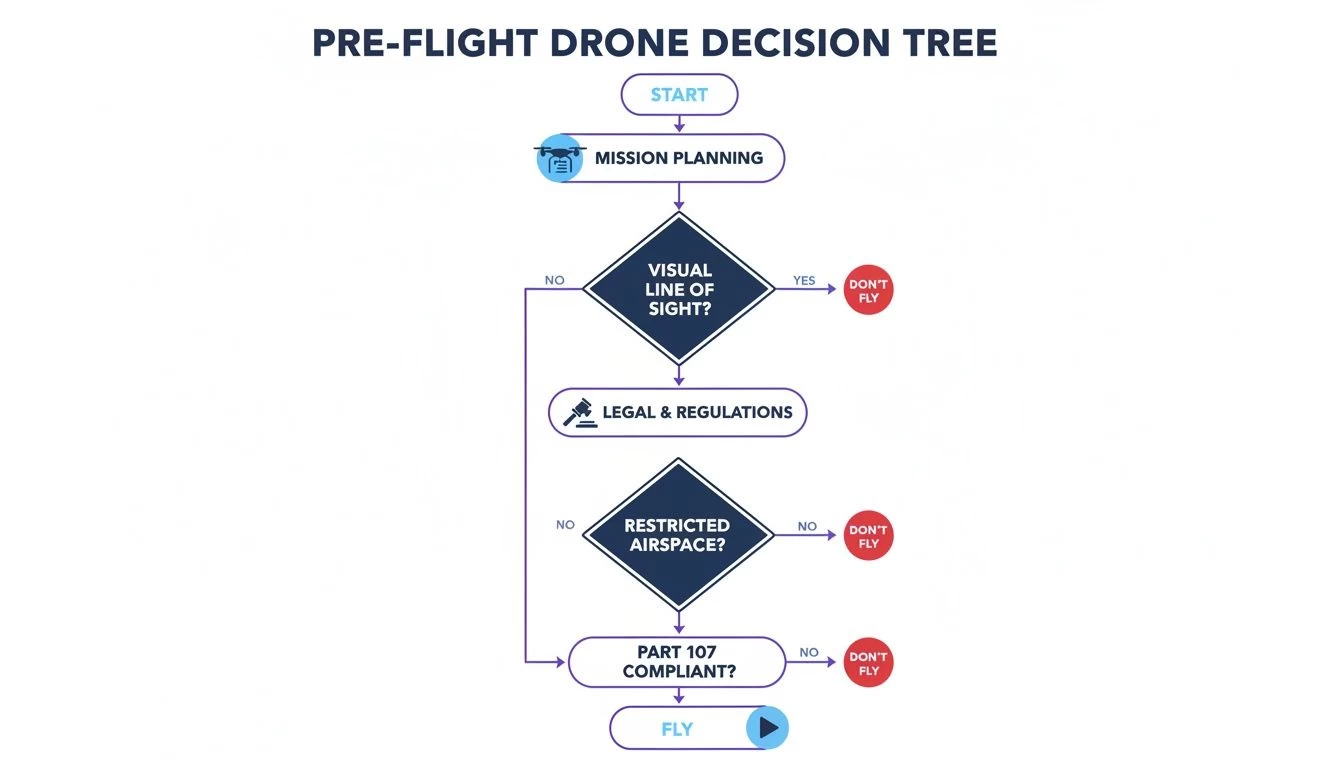
This flowchart is a great reminder that every flight needs to pass through a safety and legality checkpoint before you even think about taking off. It turns a complex process into a simple, repeatable habit.
Getting the Green Light with Modern Tools
For flights in controlled airspace, the FAA’s Low Altitude Authorization and Notification Capability (LAANC) system is your best friend. LAANC is an automated system that gives drone pilots near-instant permission to fly in many controlled zones.
Most of the popular drone apps you're already using, including the FAA’s own B4UFLY app, have LAANC built right in. You just open the app, tap your flight area, enter your altitude and duration, and hit submit. Usually, an automated approval comes through via text or notification in seconds.
What used to be a weeks-long waiver process can now be done right there on-site, just before you fly. It’s a game-changer.
Key Takeaway: Never assume airspace is clear just because you don't see an airport. Always, always check your apps before every single flight. Temporary Flight Restrictions (TFRs) can pop up with little notice for big events, emergencies, or VIP movements.
By integrating these simple checks into your pre-flight workflow, you’re not just following the rules. You’re protecting yourself, your clients, and the integrity of the national airspace. It's what being a true professional is all about.
Navigating Ground-Level Rules and Restrictions
Getting the all-clear from air traffic control is a huge step, but honestly, it’s only half the battle. Too many pilots—even professionals—get so laser-focused on airspace that they completely forget about the rules right under their feet. The ground you take off from is governed by a messy patchwork of state, county, and local laws that can shut down a mission just as fast as a TFR.
Put simply, just because the airspace is clear doesn’t give you the right to be there. This is a critical distinction that separates the pros from those who end up dealing with angry landowners or, worse, local law enforcement.
Your flight permission is a two-part equation: approval from the FAA for the sky, and approval from the property owner for the ground.
Ignoring these ground-level rules can land you in serious trouble, from trespassing charges and nuisance complaints to violating some obscure local ordinance you never even knew existed.
Unpacking Local Drone Ordinances
While the FAA has sole authority over the skies, states and local municipalities absolutely control their own land. This means they can—and often do—create rules about where you can and cannot launch, land, or operate a drone.
For example, a city might prohibit drone takeoffs from any public park without a specific, hard-to-get permit. A county could have a blanket ban on operating drones near critical infrastructure like water treatment plants. These rules are hyper-local and won’t show up on your standard FAA app.
This means you’ve got to do some old-fashioned, ground-level research before every single flight. Here’s what that looks like in the real world:
- Start with State Laws: Your first stop should be the state level. Many states have passed their own drone laws, often focused on privacy or interfering with emergency responders. A quick search for "[State Name] drone laws" will usually get you what you need.
- Dig into County and City Rules: This is where you have to get granular. Head to the official website for the county or city you're flying in and search their municipal code for terms like "drone," "UAS," or "unmanned aircraft." It can be tedious, but it’s essential.
- Actually Call the Parks Department: If you're thinking about flying in or near a public park, never assume it's okay. Always call the local parks and recreation department directly. Some have designated flying fields, while others have outright bans. Don’t risk it.
Respecting Property and Privacy
Beyond formal laws, there are the unwritten—but legally critical—rules of property rights and privacy. Flying over private property without consent is a bit of a legal gray area, but taking off from it without permission is straight-up trespassing.
Always, always secure explicit permission from the landowner before you set foot on their property to launch. For commercial jobs, this should be a standard clause in your client contract, confirming they have the authority to grant you access.
Privacy is another huge one. Even if you're flying legally from a public spot, pointing your camera into someone's backyard is a fast track to a nuisance complaint. Maintain a professional buffer and keep your lens focused only on your target.
Navigating Special Land Designations
Certain areas come with their own strict set of ground rules that trump everything else. National Parks are the classic example. Flying a drone within the boundaries of any U.S. National Park is almost universally prohibited to protect wildlife and the visitor experience. Our guide on flying a drone in national parks gets into the nitty-gritty of these restrictions.
Similarly, wildlife refuges, wilderness areas, and many state forests have their own bans in place. The logic is simple: these are sensitive environments where a drone can easily disturb nesting birds or spook animals. It’s also important to understand the broader context of public land access. For instance, knowing what Crown land means in Canada and how it’s governed highlights how different public lands have wildly different rules—a principle that applies worldwide.
Ultimately, your job as a pilot is to be a detective. Before every mission, you have to investigate all the layers of rules that apply to your specific takeoff spot. It’s an extra step, but adding this ground-level check to your pre-flight workflow ensures every flight is not only safe in the air but also fully compliant on the ground.
Scouting Locations for Your Specific Mission

The answer to "where can I fly my drone?" changes dramatically with every single job. What makes a perfect spot for a cinematic video is often a terrible one for a utility inspection, and vice versa. Your mission objectives have to drive your location scouting, turning a generic search into a targeted, professional process.
Simply finding a wide-open field just doesn't cut it. You need to think like a director for creative projects and a logistics expert for technical ones. Each type of mission comes with its own set of environmental and operational needs that you have to nail down long before you even think about showing up on-site.
This "mission-first" approach saves a ton of time, cuts down on risks, and ultimately leads to a much better final product for your client.
Finding the Perfect Shot for Photographers and Videographers
For creative jobs, your location is more than just a place to fly—it's your canvas. The real goal is finding a spot with compelling compositions, the right kind of light, and as little public interference as possible. You're not just looking for an open area; you're hunting for a scene.
Your scouting should be all about the visual elements and anything that could disrupt the shoot.
- Compositional Interest: Keep an eye out for leading lines, natural frames, and interesting textures. A winding river, a dramatic cliffside, or a unique piece of architecture can turn a simple shot into something spectacular.
- Lighting Conditions: Think about the time of day. That soft light during the "golden hour"—right after sunrise or just before sunset—creates long shadows and a warm glow that's perfect for cinematic footage. Midday sun, on the other hand, can be harsh and create ugly, unflattering reflections.
- Public Presence: A beautiful park might look ideal, but if it’s packed with people, you’ll spend more time managing safety than getting your shots. Look for locations that see less foot traffic or plan your flight for off-peak hours, like early on a weekday morning.
A classic mistake is picking a location that looks stunning on camera but is an operational nightmare. You've got to balance the creative potential with the practical realities of flying safely and without bothering anyone.
Pinpointing Locations for Surveying and Inspections
When the mission is technical, your scouting priorities flip from aesthetics to pure logistics and safety. For surveyors and inspectors, the ideal location is one that gives you maximum coverage of the asset while ensuring a safe, clear area to operate from.
Your main focus here should be on your takeoff zones and maintaining a solid visual line of sight (VLOS). A safe takeoff and landing zone (TOLZ) needs to be flat, stable, and well clear of obstructions like power lines, trees, or buildings. It also needs to be secured from public access to avoid any surprise interruptions.
On top of that, the TOLZ has to offer an unobstructed view of the entire target, whether that's a cell tower, a pipeline, or a building facade. If you're constantly having to move your takeoff spot just to keep the drone in sight, you're killing your efficiency and introducing unnecessary risk.
Virtual Scouting with Digital Tools
On-site reconnaissance is fantastic, but you can get 90% of your location scouting done right from your desk using digital tools. This "virtual scout" saves an incredible amount of time and fuel, letting you check out multiple potential spots before you ever leave the office.
Google Earth Pro is an absolutely indispensable tool for this. It's so much more than a map; it's a powerful 3D simulator that lets you pre-plan your entire mission.
Here’s a practical workflow I use for virtual scouting:
- Terrain Assessment: Use the 3D view to spot potential obstructions, big changes in elevation, and find the flattest ground for your TOLZ.
- Line of Sight Planning: Drop a pin on your potential TOLZ and another on the target asset. Use the ruler tool to check the distance and elevation profile, which will confirm if you'll have a clear VLOS.
- Flight Path Simulation: You can map out entire flight paths, creating waypoints to ensure you get full coverage for a survey or to plan a smooth cinematic camera move. This helps you see challenges coming before they become problems on-site.
By combining these digital tools with a mission-specific mindset, you change location scouting from a guessing game into a precise, efficient part of your professional workflow. This prep work ensures that when you do arrive on-site, you're ready to fly with total confidence.
Using Technology for Smarter Flight Planning
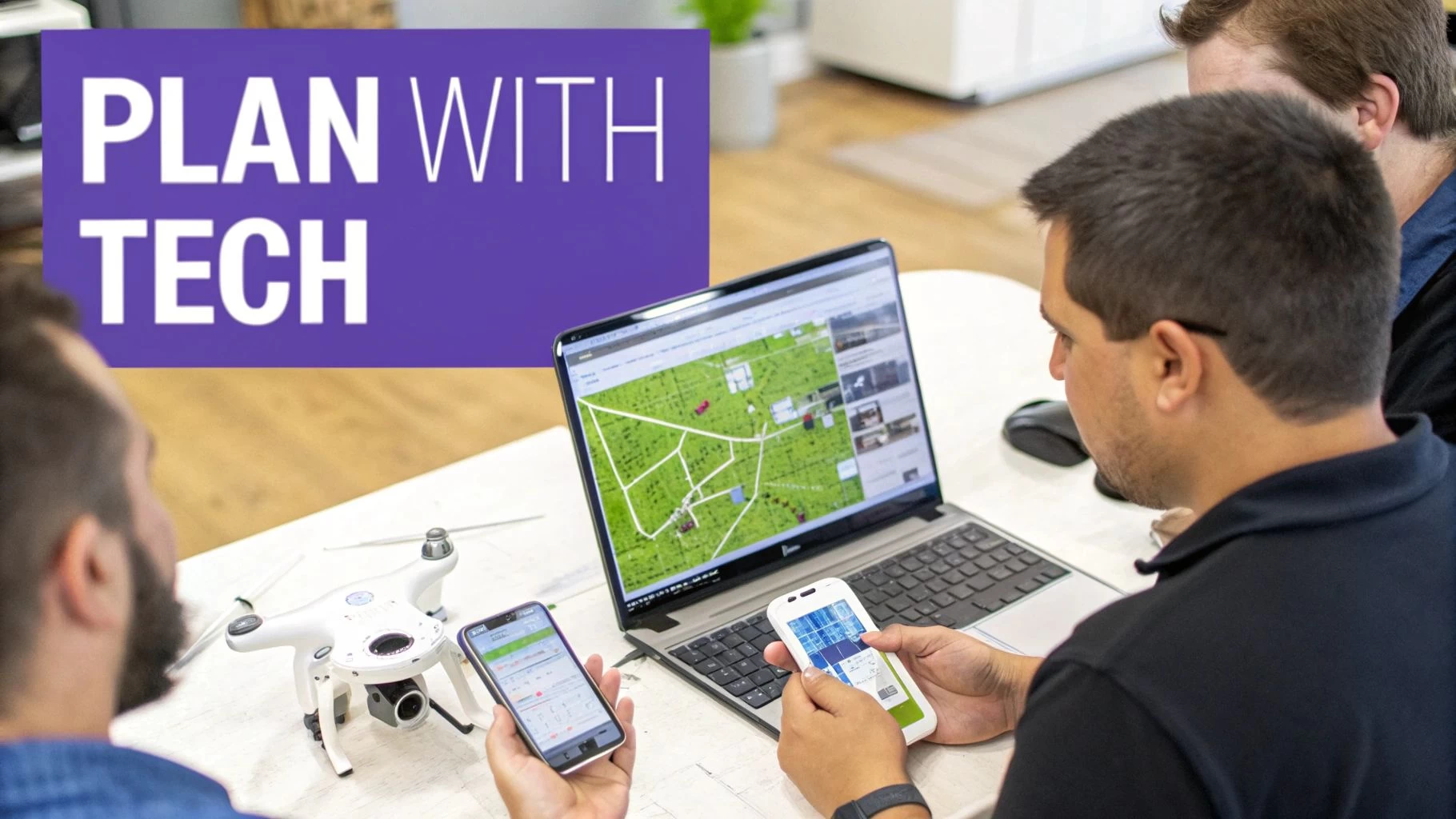
Trying to plan a flight by juggling a handful of different apps and websites is a surefire way to miss something critical. It's a classic case of inefficiency breeding risk. When your airspace map, weather app, and client notes all live in different places, it’s far too easy for crucial details to slip through the cracks.
That’s why today's professional pilots don’t just use apps—they adopt integrated systems. It’s about building a workflow that ensures every single flight is safe, compliant, and buttoned-up from the initial inquiry to the final log entry. The right tech stack turns the puzzle of "where can I fly my drone" into a smooth, repeatable process.
The Role of Airspace Intelligence Apps
Standalone airspace apps are the bedrock of any pilot's digital toolkit. Think of tools like Aloft (you might remember it as Kittyhawk) or the FAA's own B4UFLY. Their job is to give you immediate, location-based intelligence on airspace classes, TFRs, and other advisories.
These apps are indispensable for quick, on-the-spot checks. You pull up to a site, open the app, and get an instant picture of the sky. Got an unexpected TFR for a local football game? These tools give you that real-time awareness to stay grounded and avoid a costly mistake. They are your first line of defense and essential for grabbing quick LAANC authorizations.
But that’s where their job ends. While fantastic for a snapshot of the airspace, they don't see the bigger picture. They won’t help you manage client details, track your drone's maintenance schedule, or generate the detailed risk assessments that professional operations demand.
Comprehensive Operations Platforms
This is where a true drone operations management platform like Dronedesk changes the game. It moves beyond just answering if you can fly to helping you manage the entire job from start to finish. These platforms aren't just for flying drones; they're built for the business of flying drones.
Consider it the central hub for your entire operation. A lead comes in, and you log it. From that single entry, you can build a quote, plan the flight, run automated airspace and ground hazard checks, and produce a full-blown risk assessment—all without leaving the platform.
The real value of an operations platform isn't just about making things easier; it's about creating a single source of truth for every mission. It ensures nothing gets missed and gives you a complete, auditable record of compliance.
Imagine you’re running a small drone team juggling multiple projects. One day it's a roof inspection in controlled airspace, the next it’s a farm survey out in the countryside. A platform keeps every flight log, risk assessment, and compliance document perfectly organized and tied to the right job. This drastically cuts down on admin time and kills the risk of simple human error.
Choosing Your Tech Stack
So, which type of tool is right for you? It really boils down to the scale and complexity of what you're doing. A quick look at their core functions makes the distinction clear.
Drone Planning Tools Feature Comparison
While both types of tools are valuable, they serve very different purposes. A simple airspace app is great for a quick look, but a full platform is what you need to run a business.
| Feature | Standalone Airspace Apps (e.g., B4UFLY) | Operations Platforms (e.g., Dronedesk) |
|---|---|---|
| Primary Use | Quick, on-the-go airspace checks and LAANC. | End-to-end business and flight operations management. |
| Key Functions | Airspace maps, TFR alerts, automated authorizations. | Client management, risk assessments, equipment logs, flight planning. |
| Best For | Hobbyists and quick pre-flight checks by any pilot. | Solo professionals, drone teams, and enterprise operations. |
| Compliance | Provides necessary airspace data for compliance. | Creates an auditable trail of all compliance activities. |
For any serious commercial pilot, the choice isn't really one or the other. You need both. Your standalone app is perfect for that last-minute field check, but a platform like Dronedesk is what truly professionalizes your entire workflow, making your business more efficient, more compliant, and ultimately, more profitable.
Answering Your Top Drone Flight Questions
Once you’ve got a handle on airspace maps and ground rules, the real world throws the tricky questions at you. This is where the rubber meets the road for a professional pilot—moving beyond just following the rules to making smart, defensible decisions out in the field.
Let's dig into some of the most common "what-if" scenarios pilots run into. The answers aren't always a simple yes or no, but figuring out the gray areas is what keeps you flying safely and legally.
Can I Fly My Drone in a State or National Park?
Let's get the easy one out of the way first: National Parks. The answer here is a hard no. The National Park Service has a near-total ban on launching, landing, or flying drones inside park boundaries. It’s all about protecting the wildlife and keeping the natural peace for everyone else.
State Parks are more of a mixed bag, but don't get your hopes up. Most are following the national lead and have either banned drones outright or confined them to tiny, designated flying areas.
- Check the source: Never, ever assume a state park is good to go. Always check their official website or call a ranger.
- Permits are rare: Some parks might issue a special use permit for a commercial or scientific gig, but expect a mountain of paperwork and a long wait.
- Respect the rules: Flying where you shouldn't can get your gear confiscated and land you a nasty fine.
The best policy is to treat all protected lands—whether they're national, state, or even local—as no-fly zones unless you have explicit permission in writing.
How Do I Get Permission to Fly Over Private Property?
This one comes up on almost every commercial job. While the FAA owns the airspace, the person on the ground owns the property and has a reasonable expectation of privacy. Flying over their land is a bit of a legal gray area, but taking off or landing on it without asking is straight-up trespassing.
The only professional approach is to get permission before you even power up.
For any commercial work, this needs to be baked right into your client contract. Make sure there’s a clause that says your client gives you legal access to the property to launch, land, and carry out the flight. This covers both your back and theirs.
What if you need to pop over a neighbor's yard for the perfect shot? The old-fashioned way works best. Knock on the door, be friendly, explain what you're doing, and ask if they mind. A little courtesy and transparency go a long way, and most people are surprisingly cool about it.
Is It Better to Fly in Urban or Rural Areas?
Honestly, it depends entirely on the job and how much of a headache you're willing to deal with. Both spots have their own unique brand of challenges.
Flying in the City:
- Complex Airspace: Cities are almost guaranteed to be in controlled airspace (Class B, C, or D). You'll be using LAANC for authorization constantly.
- Privacy Headaches: With so many people and buildings packed together, privacy is a huge deal. You have to be incredibly mindful of where your camera is pointing.
- Signal Chaos: All those Wi-Fi networks and radio signals can sometimes mess with your drone's connection.
Flying out in the Country:
- Wide Open Skies: You're far more likely to be in Class G airspace, which means less red tape to get airborne.
- Hidden Dangers: Don't get complacent. Rural areas are full of unmarked towers, power lines you don't see until it's too late, and even aggressive birds.
- Spotty Connection: If your mission needs a solid data connection, poor cell service in the middle of nowhere can shut you down fast.
At the end of the day, neither is "better." A true pro knows how to size up the risks of any environment and build a solid plan to match.
Ready to stop juggling apps and start managing your drone business like a pro? Dronedesk puts everything from client management and flight planning to risk assessments and compliance logging into a single, powerful platform. See how thousands of pilots are saving time and flying smarter at https://dronedesk.io.
 How to Evaluate a Free Drone Logbook Before Using It →
 FAA Part 107 Test: How to Master Airspace Questions →
 Drone Risk Assessment Controls That Work in the Field →
 FAA Drone License Costs Beyond the Knowledge Test →
 Drone Part 107 Operations: When a Waiver May Be Needed →
 Drone Operating Rules for Managing Contractors and Employees →
 BVLOS Drone Requirements for Building a Safety Case →
 Drone Pilot Test Mistakes That Cost Candidates Marks →
 FAA 107 License vs Part 107 Certificate: What’s the Difference? →
 Drone Airport Rules: A Field Checklist for Site Assessments →