
Your UAS Pilot Logbook: A Complete Guide for 2026
You finish a flight, pack the batteries, send a few preview images to the client, and tell yourself you'll update the logbook later. Then later turns into tomorrow. A week after that, a battery starts behaving oddly, a client asks for proof of who flew the mission, or an insurer wants a clean record of the aircraft's recent activity. That's when sloppy logging stops being an admin task and becomes a business problem.
A professional UAS pilot logbook isn't just a place to store flight time. It's the record that proves what happened, who did it, what aircraft was involved, and whether the operation was run with discipline. New commercial pilots often think of logging as something you do to stay organized. Experienced operators know it protects revenue, supports maintenance decisions, and gives you something defensible when questions start.
Why Your Drone Logbook Is More Than Just a Notebook
The logbook became far more important once commercial drone work moved from informal flying into regulated operations. In the United States, FAA Part 107 took effect on August 29, 2016, creating a dedicated framework for small unmanned aircraft operations, and many logbooks were then built around Part 107-style recordkeeping requirements, as outlined in ASA's overview of the standard UAS operator logbook.
What matters in day-to-day work is this. The FAA doesn't expressly require every Part 107 pilot to keep a flight log, but independent guidance notes that logging is strongly recommended because records can be requested and are useful for documenting experience, night operations, and operational history. That changes the role of the logbook immediately. It stops being optional in any practical sense if you want to operate like a professional.
A weak logbook creates problems in predictable places:
- After an incident: You need to show the aircraft used, where it flew, and any unusual notes from the sortie.
- During client or insurer questions: You need one clean record, not scattered notes across texts, spreadsheets, and memory.
- When proving pilot experience: You need documented history, not rough estimates.
If you can't reconstruct a flight quickly, you don't really control your operation.
That's why modern UAS pilot logbooks usually include structured fields like date, time, location, aircraft identification, weather, and remarks. Those aren't there for decoration. They capture the same core operational facts aviation teams have always relied on for accountability.
For a practical look at how operators structure records, this guide to a drone flight log book is worth reviewing. The big shift is simple. Commercial teams no longer rely on casual notes. They build operational records that can stand up to scrutiny.
What Every UAS Pilot Logbook Must Contain
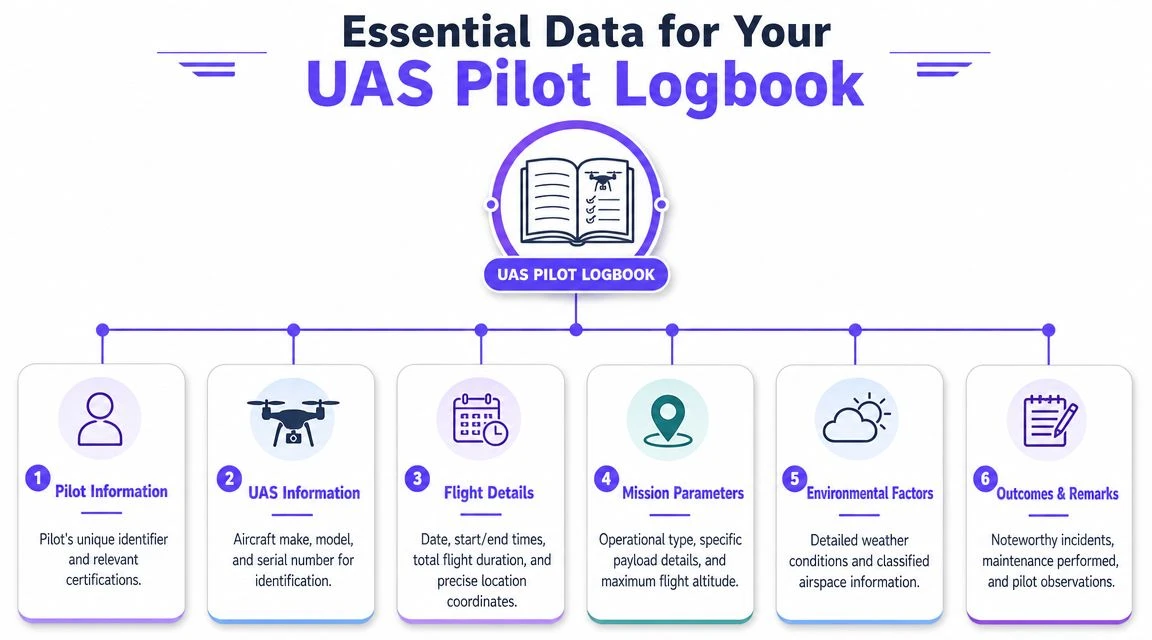
A useful logbook starts with the fields you must be able to produce without hesitation. If you miss the basics, everything else falls apart.
The non-negotiable flight record fields
At minimum, every entry should identify the pilot, the aircraft, the time, and the place. That means you should record:
- Pilot identity: Who flew the mission and in what role.
- Aircraft identity: Make, model, and a unique identifier such as serial or internal fleet ID.
- Flight timing: Date, start time, end time, and duration.
- Location: Takeoff site, landing site, and enough location detail to identify the operating area.
- Mission context: What the flight was for.
- Remarks: Anything unusual, including defects, interruptions, or environmental issues.
These are the fields that let you rebuild the operation later. Without them, the log is just a diary.
Practical rule: If someone asks what flew, who flew it, where it flew, and whether anything went wrong, your logbook should answer all four in under a minute.
What a robust professional record looks like
A lot of pilots stop at flight hours. That's too thin for commercial work.
The UK's Specific Category under PDRA01 provides a good benchmark for what a serious logbook can include. The UK Civil Aviation Authority states that the operator must keep an aircraft technical logbook with make and model, serial or registration number, date, time, duration, takeoff and landing locations, the Remote Pilot for each flight, total flight hours or cycles, operation details, incidents, pre-flight inspections, site risk assessments, radio frequency surveys, and maintenance or defect history. It also says the logbook must be kept up to date, retained for at least 3 years, and maintained in a digital format, according to the CAA PDRA01 operator responsibilities guidance.
That list matters even if you don't operate under UK rules. It shows what an auditable record looks like when an authority expects the logbook to connect flight activity with airworthiness and operational control.
Fields that save you later
The best commercial logs also include items that many pilots treat as optional:
- Weather conditions: Enough detail to explain operational decisions.
- Battery used: Which pack powered the flight, especially for fleet operations.
- Payload details: Camera, sensor, or other equipment onboard.
- Pre-flight status: Confirmation that checks were completed.
- Defects or squawks: Anything that needs follow-up before the next sortie.
Those details reduce ambiguity. They also make maintenance planning easier because issues don't get buried in free-text notes.
Sample Logbook Entries and Templates
The easiest way to tighten your logging habits is to stop thinking in abstract categories and look at what a clean entry looks like. A good record is brief, specific, and readable by someone who wasn't on site.
Sample UAS Pilot Logbook Entries
| Date | Aircraft ID | Location | Pilot | Flight Time | Mission Type | Notes/Incidents |
|---|---|---|---|---|---|---|
| 2026-01-14 | M3E-01 | Industrial estate, roof survey zone | A. Smith | 00:18 | Real estate photography | Pre-flight inspection complete. Light wind. Standard photo capture. No defects noted. |
| 2026-01-18 | M30T-04 | Substation perimeter, south access point | J. Patel | 00:42 | Infrastructure inspection | Two battery changes during mission. Gusty conditions observed. Minor gimbal vibration noted during second sortie. Aircraft flagged for post-flight inspection before next deployment. |
The first entry is simple on purpose. It tells you what aircraft flew, where it happened, who was responsible, how long the operation lasted, and whether anything worth attention came up.
The second entry does more than log time. It creates a trail. If the gimbal issue appears again, the team can connect that observation to the specific mission and inspect the aircraft before reuse.
What a usable template should do
A strong template should make it hard to forget key details. It should also avoid forcing pilots to write long narratives after routine jobs.
Use a template that gives you:
- Fixed fields for recurring data: Date, pilot, aircraft, location, mission type.
- A notes area for exceptions: Defects, incidents, abnormal weather, client-relevant issues.
- Clear identifiers: Internal aircraft and battery naming conventions matter more than fancy formatting.
If your current template produces vague entries like “inspection flight completed,” it's not doing its job. The point is to create a record another pilot, manager, regulator, or insurer can understand quickly.
Choosing Your Workflow Paper vs Digital Logbooks
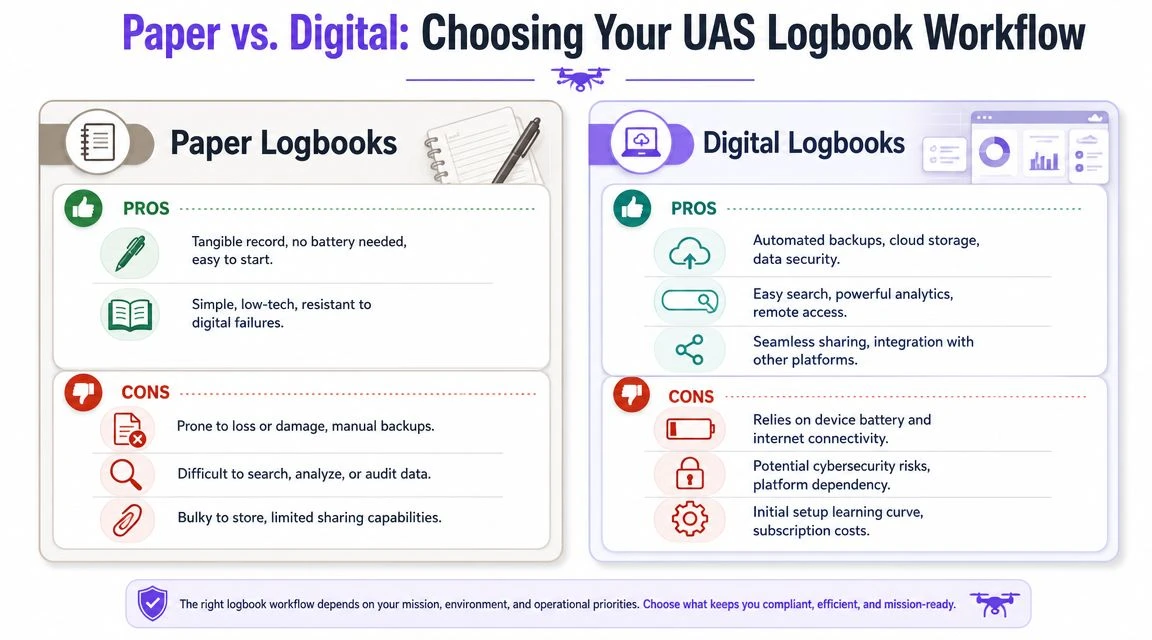
Most operators don't fail at logging because they don't know what to record. They fail because their workflow makes consistent logging annoying. That's the paper versus digital question.
Where paper still works
Paper logbooks still make sense in a few situations. They're simple, tangible, and don't depend on battery life, app updates, or connectivity. For solo pilots running straightforward operations, a paper notebook can be enough if the discipline is there.
Paper also works well as a field backup. Some pilots like writing quick notes on site and transferring them later. If that's your method, use a setup that's easy to write on in bright daylight or while wearing gloves. A fine-tip Stylus Pen can also help if your field workflow mixes handwritten notes with tablet entry.
The downside is cumulative. Paper gets slow once you need to search old records, compare aircraft histories, or share records across a team.
Where digital pulls ahead
Digital systems solve the problems that start showing up as soon as your operation gets busier. Search is faster. Standardization is easier. Sharing records with managers, clients, or authorities is far less painful. Retention is also easier to control when records need to stay accessible over time.
One source focused on EU operations notes that operators in the Specific Category must keep UAS operation records for a minimum of three years, but formats vary widely. It also notes that this becomes a recurring pain point for teams operating across markets because the logbook has to satisfy audit, insurance, and internal governance demands, and there is no single global template. The same source argues that the value of a modern digital logbook is in creating a defensible operational history through synchronized data, as described in this guide to using a logbook for drone flights.
That matches what operators see in practice. Digital wins when you need to do any of the following well:
- Search old missions quickly
- Retain records without boxes of notebooks
- Standardize entries across multiple pilots
- Support audits without rebuilding data manually
- Connect flight records with inspections and maintenance
A paper logbook records activity. A good digital workflow preserves context.
For operators deciding how far to go, this article on a digital pilot logbook is a useful reference point. The trade-off is straightforward. Paper is easy to start. Digital is easier to sustain once compliance, maintenance, and team coordination start to matter.
Best Practices for Accurate and Auditable Logs
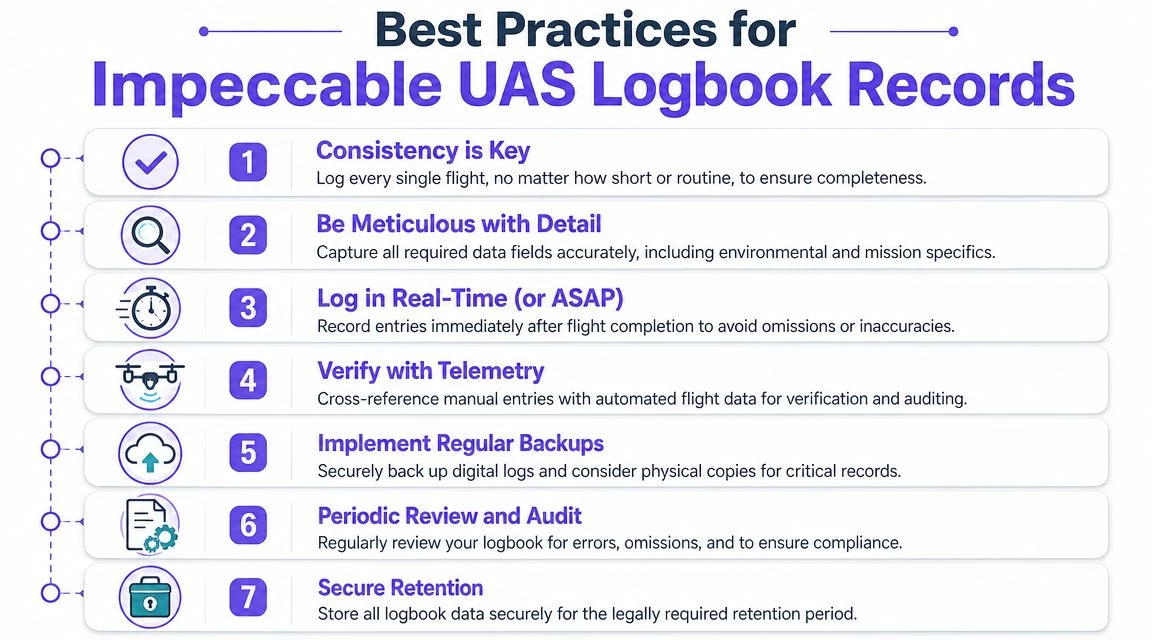
The difference between a compliant log and a defensible one is process. Good records don't happen because a pilot has good intentions. They happen because the workflow leaves little room for drift.
Build habits that survive busy days
The first rule is simple. Log flights immediately after landing, or as soon as the aircraft is secure. Memory gets fuzzy fast, especially after multiple sorties, battery swaps, or client interruptions.
The second rule is consistency. Teams should use the same aircraft IDs, location naming conventions, and defect terminology. If one pilot writes “battery issue,” another writes “power warning,” and a third writes “abnormal voltage,” you've made later analysis harder for no benefit.
Use these habits as your baseline:
- Log every flight: Even short test hops and repositioning flights should be recorded.
- Write for a third party: Assume someone else will need to understand the entry months later.
- Separate facts from interpretation: Record what happened first, then note your assessment if needed.
Treat the logbook as an operational record
Logging requirements often present challenges for commercial teams. Basic logging guidance often focuses on flight date, location, aircraft make and model, duration, and remarks. But professional operations usually need more than that.
Guidance in the Oklahoma UAV Flight Log Checklist points out that the more useful records for professional teams also include maintenance, software updates, battery cycles, and incident history. It also argues for treating the logbook as an operational record, not just a pilot-hours ledger, by capturing who flew, what aircraft was used, where and when the mission occurred, and any squawks or defects tied to that sortie.
That's the standard worth following.
A flight entry without linked aircraft condition data is often too weak to help when something goes wrong.
Audit your own records before someone else does
Self-audits catch the failures that creep in undetected. Missing pilot names, inconsistent aircraft IDs, blank remarks fields after abnormal flights, and maintenance actions recorded somewhere else entirely are all common problems.
A quick recurring review should check:
| Check area | What to look for |
|---|---|
| Flight completeness | Every sortie recorded, including short operational flights |
| Aircraft traceability | Entries consistently tied to the correct drone |
| Defect follow-up | Squawks matched to inspection or maintenance action |
| Terminology | Team members using the same labels and identifiers |
If your records can't tie a specific flight to a known aircraft condition, they're not audit-ready.
Integrating Logbooks with Drone Operations Platforms
A standalone logbook is better than nothing. An integrated workflow is far more useful.

The greatest value emerges when logging is connected to the rest of your operation. Flight planning, pilot records, aircraft profiles, battery tracking, maintenance notes, and reporting all inform each other. Once those records live in separate places, admins spend too much time re-entering the same facts and too little time managing risk.
What integration changes
An integrated platform can turn a UAS pilot logbook into an active operational dataset instead of a passive archive. That improves three areas immediately:
- Compliance workflow: Planned jobs, completed flights, pilot assignment, and aircraft usage stay connected.
- Maintenance visibility: Defects noted after a sortie can be tied directly to the aircraft record.
- Business reporting: Teams can review asset use, mission history, and operational patterns without digging through notebooks and spreadsheets.
This is especially important for teams handling repeat clients, recurring sites, or multiple pilots sharing the same fleet.
Where platform-based logging helps most
Platforms that combine planning and logging reduce duplicate entry. Some also sync flight information directly from supported drones, which cuts down on transcription mistakes and missing data. In practical terms, that means fewer end-of-day admin gaps and cleaner records when someone asks for proof.
One example is Dronedesk, which combines flight logging with broader operations management and supports direct syncing for some DJI-based workflows. That matters because the logbook then sits inside the same system as job planning, fleet records, and reporting, instead of being maintained as an isolated document. If you want to see how that kind of workflow reduces repetitive admin, this article on automated flight logging and reporting for drone teams is a practical read.
The main point isn't that every operator needs the same software. It's that your logbook should help you run the business, not just survive an audit.
If your flight records are still split between notes apps, paper sheets, and pilot memory, it's worth looking at Dronedesk. It gives commercial operators one place to plan jobs, manage aircraft and pilots, log flights, and keep records organized enough for compliance, maintenance tracking, and client reporting.
 Drone Risk Assessment Controls That Work in the Field →
 FAA Drone License Costs Beyond the Knowledge Test →
 Drone Part 107 Operations: When a Waiver May Be Needed →
 Drone Operating Rules for Managing Contractors and Employees →
 BVLOS Drone Requirements for Building a Safety Case →
 Drone Pilot Test Mistakes That Cost Candidates Marks →
 FAA 107 License vs Part 107 Certificate: What’s the Difference? →
 Drone Airport Rules: A Field Checklist for Site Assessments →
 FAA Part 107 Record-Keeping Rules for Commercial Teams →
 How to Review a DJI Flight Log After an Unexpected Event →