
A Drone Pilots Guide to Renewing Part 107 Certification
Let's be honest, renewing your Part 107 certificate used to be a real pain. Now? It's a completely free, online process you can knock out in about two hours. The FAA finally did away with the old, expensive, in-person recurrent knowledge test, which makes staying current and legal easier than ever.
Why Your Part 107 Renewal Is Simpler Than You Think
Keeping your Part 107 cert up-to-date is non-negotiable for any professional drone pilot. It shows you're current on the latest rules, protects you from legal headaches, and keeps your clients' trust. For years, this meant booking a proctored exam at a testing center and shelling out a hefty fee every 24 months.
That old system was a genuine hurdle for a lot of pilots. The cost, the travel, and the time commitment were common complaints I heard all the time. Thankfully, things have changed—massively for the better.

The Old Way vs. The New Way
The big shift happened back on April 21, 2021, when the FAA scrapped the in-person recurrent test and all its fees. This move to a fully online system has dramatically lowered the barrier for staying compliant. It's no surprise that by December 2023, the FAA had issued 368,883 Remote Pilot certifications—a jump of over 120,000 since 2021. You can see how this change impacted the industry in a great breakdown on Flymotionus.com.
Let’s really break down how much easier things are now.
The biggest takeaway is this: the renewal is no longer a memory test but an educational refresher. The FAA's goal isn't to create an obstacle; it's to make sure pilots are up to speed on new rules, like night operations.
This is a win for everyone, from solo operators managing their own credentials to large companies tracking certifications for dozens of pilots. Once you see the differences side-by-side, you'll realize just how straightforward your next renewal will be.
Part 107 Renewal Then vs. Now
Looking back, the old renewal process feels almost archaic compared to what we have today. The table below really puts the changes into perspective, showing just how much time and money pilots are saving.
| Aspect | Old Method (Pre-2021) | Current Method (Online Recurrent Training) |
|---|---|---|
| Cost | ~$175 per attempt | $0 (Completely Free) |
| Location | FAA-approved testing center | Anywhere with an internet connection |
| Time | 2-3 hours for travel & testing | ~2 hours, self-paced |
| Format | Proctored, in-person exam | Online training course with exam |
| Accessibility | Limited by testing center availability | Available 24/7 on the FAASTeam website |
The shift from a costly, inconvenient exam to a free, accessible online course is one of the most pilot-friendly updates the FAA has made. It treats experienced pilots like professionals who just need a refresher on the latest rules, not a re-test of foundational knowledge.
Your Walkthrough of the FAA Recurrent Training Course
Let's be honest, navigating any government website can feel like a bit of a maze. The good news? Renewing your Part 107 certificate on the FAA Safety Team (FAASTeam) site is surprisingly straightforward. This free online course is the whole renewal process in one package, and it's designed as a refresher, not a grueling exam.
First things first, you'll need to head over to the official FAASTeam website. If you've been through this before or set up an account for your initial Part 107, you can just log right in. If it's your first time or you can't remember your password, you'll have to create a new account or go through the password recovery steps.

This is your home base for all the training materials and the final quiz you'll need to complete your renewal.
Finding the Right Course
Once you're in, the trick is finding the exact course you need. The FAA has a ton of different training modules on their site, which can be confusing.
The one you're looking for is titled "Part 107 Small UAS Recurrent (ALC-677)". The quickest way to get there is to just use the search bar. Punch in "ALC-677" and it should pop right up. This saves you a lot of clicking around and makes sure you land in the right spot. Click to enroll, and you're in.
Navigating the Training Modules
The course itself is broken down into a handful of modules. These are laser-focused on the most critical and, more importantly, the most recently updated areas of drone regulations. They want to make sure you're up to speed on what's changed.
You can expect a solid review of topics like:
- Operations Over People and Moving Vehicles: This gets into the weeds on the four categories of eligible drones and the specific rules for flying over people.
- Night Operations: A refresher on the requirements for anti-collision lighting and what you need to know to fly safely after the sun goes down.
- Remote ID Requirements: You'll go over the rules for broadcasting identification and location info, which is a big topic these days.
- Airspace and Authorizations: This is a review of using the LAANC system and making sure you've got a handle on different airspace classes.
The whole thing is self-paced, so you can step away and come back as needed. One of the biggest questions pilots ask is about the difficulty of the Part 107 recurrent test, but here's the key: it's an open-book exam. Seriously. You can have the course materials open in another browser tab while you're taking the quiz.
The FAA isn't trying to trip you up here. The goal of this online renewal is purely educational—they just want to ensure active pilots are current on the latest rules. Think of the exam as a confirmation that you've absorbed the new information.
The final quiz is all multiple-choice. You do need a 100% to pass, but don't let that intimidate you. You can retake it as many times as you need, no penalty. If you miss a question, the system points you to the right answer, so you can learn from it and try again.
Completing the Process and Saving Your Certificate
Once you've aced the quiz, you'll be able to download your completion certificate. This little PDF is your official proof that you're current. It is critically important that you save this document immediately.
I recommend saving a digital copy to a secure cloud folder (like Google Drive or Dropbox) and maybe even printing a physical copy to stick in your flight bag with your original Part 107 card.
If you're part of a team, this is the perfect time to upload that certificate directly into your drone operations platform. For instance, in Dronedesk, you can attach it to your pilot profile, which keeps all the team's compliance records centralized and easy to track.
And that's it! This final step completes your renewal, and you're good to fly commercially for another 24 calendar months.
Common Renewal Mistakes and How to Avoid Them
Renewing your Part 107 certificate is a straightforward process, but its very simplicity can breed complacency. I've seen it time and again: smart, professional pilots overlooking a few key details, leading to unnecessary stress, last-minute scrambles, and sometimes, even a temporary halt to their commercial operations.
Picture this: a pilot has a huge surveying contract lined up for the first week of July. They casually log in to renew their certificate on June 30th, only to find they've completely forgotten their FAASTeam password. After a frustrating reset process, they discover the site is bogged down with high traffic. That last-minute panic nearly cost them a massive project—a situation that was 100% avoidable.
The Last-Minute Scramble
By far, the most common mistake is simple procrastination. Pilots see the 24-calendar-month deadline and figure they have plenty of time. But waiting until the final few days is a dangerous gamble.
There are two critical details many pilots get wrong about the deadline:
- It’s a "Calendar Month" Rule: Your certificate doesn’t expire on the exact day two years after it was issued. It expires at 11:59 PM on the last day of the 24th month. So, a certificate issued on June 10, 2022, is valid right up until June 30, 2024.
- Technical Glitches Happen: The FAASTeam website, like any other, can have downtime or run painfully slow. Banking on it to work perfectly at the eleventh hour is a huge risk when your ability to fly legally is on the line.
Treat your renewal like any other mission-critical task. Don't leave it to chance. Proactive compliance isn't just about ticking a box; it's the mark of a true professional who never risks operational downtime over a preventable administrative slip-up.
To steer clear of this trap, set calendar reminders for yourself 60 and 30 days before your expiration month. Renewing your Part 107 early doesn't shorten your next certification window; the new 24-month clock simply starts from the month you complete the recurrent training. There is absolutely no penalty for being proactive.
Mismanaging Your Credentials
Another frequent headache is lost or forgotten login information for the FAASTeam portal. It seems like a minor issue, but fumbling for a password you haven’t touched in two years can quickly turn into a major roadblock, especially when you're up against the clock.
Here’s how to sidestep this simple but disruptive problem:
- Use a Password Manager: Store your FAASTeam credentials in a secure password manager like Bitwarden or 1Password. This means you can pull them up instantly from any device without a second thought.
- Document Everything: The moment you finish your renewal, save the completion certificate to a dedicated cloud folder (think Google Drive or Dropbox). As a backup, grab a screenshot of the final confirmation page, too. This creates redundancy and ensures you always have proof of your currency right at your fingertips.
By anticipating these common pitfalls, you can transform the renewal process from a potential source of stress into a simple, predictable part of your professional routine.
Building a Proactive Compliance System
Renewing your Part 107 certificate once is a single task. But staying consistently compliant across all your operations? That requires a real system.
If you’re a solo pilot, this could be as straightforward as a dedicated folder in Google Drive or Dropbox. Keep your original certificate, renewal confirmations, and drone registration documents all in one place. It’s simple, but it works and keeps everything easy to find.
But when you're managing a team, things get complicated fast. Relying on messy spreadsheets to track multiple pilots is a disaster waiting to happen. It's a surefire way to miss deadlines, ground your operations, and run into compliance trouble. This is where a central compliance dashboard stops being a "nice to have" and becomes absolutely essential.
The infographic below nails the common traps that a good system helps you avoid.
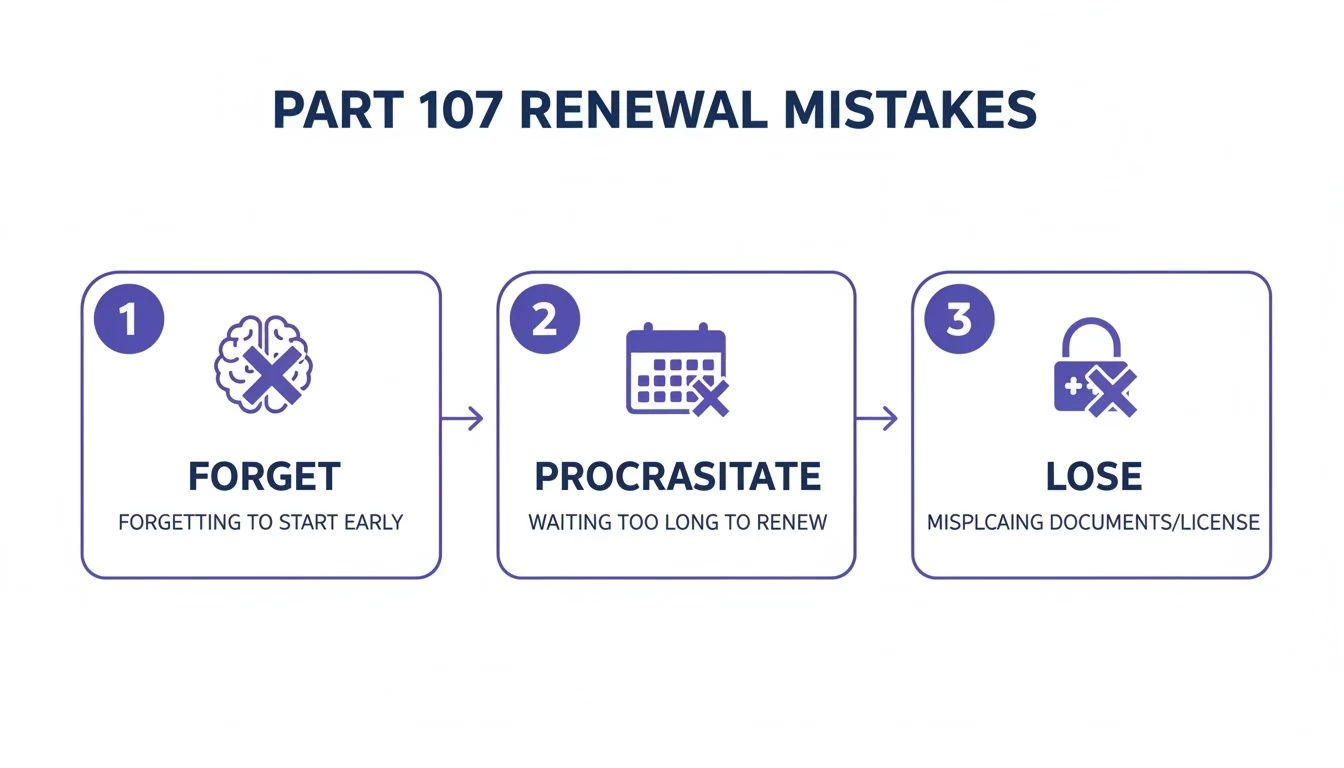
As you can see, simple human error—forgetting a date, putting it off until the last minute, or losing login details—can easily throw a wrench in your renewal process and put your business on hold.
Automating for Peace of Mind
Picture a system that automatically flags every pilot's certificate expiry date. It shoots out escalating alerts to both the pilot and management at 90, 60, and 30 days. It also gives you one secure, central spot to store all the renewed certifications. This isn't a fantasy; it's exactly what drone operations platforms like Dronedesk are designed for. It turns compliance from a recurring administrative headache into a smooth, automated process humming along in the background.
This proactive approach is becoming the industry standard. FAA data from 2023 showed that new monthly renewals before expiry shot up to 5,059—more than four times the rate in 2022. That number absolutely dwarfs the 988 average monthly renewals done after expiry. It’s a clear sign the industry is maturing, with professional operators refusing to let their certifications lapse. You can dig into more of these trends in the aerospace forecasts from the FAA.
The Real Cost of a Lapsed Certificate
Let's walk through a real-world scenario. A utilities inspection company has a team of six pilots. One pilot’s Part 107 currency quietly lapses on the last day of the month, and nobody notices. The very next day, that same pilot is scheduled for a critical power line inspection two hours away. The lapse is only caught during pre-flight checks, forcing the entire mission to be scrubbed.
The fallout is immediate and expensive:
- Lost Revenue: The day's work, worth several thousand dollars, is gone.
- Wasted Resources: The pilot's time, vehicle wear-and-tear, and fuel are all down the drain.
- Client Dissatisfaction: The client is annoyed, and the company's reputation for reliability takes a serious hit.
- Administrative Scramble: Now a manager has to frantically reshuffle schedules and rush the pilot through the renewal process.
This entire mess could have been avoided with a simple automated alert. Platforms built for compliance don't just hold data; they actively manage it to prevent these exact situations.
Think of a proactive compliance system as your operational insurance policy. It slashes administrative work, keeps your team audit-ready at all times, and wipes out the risk of expensive downtime from a simple expired certificate. It’s the hallmark of a truly professional drone operation.
Your Part 107 Renewal Checklist and Study Plan
Renewing your Part 107 certificate should be a straightforward affair, not a last-minute scramble. The best way to make it a smooth process is to have a simple action plan. This isn’t about cramming for a tough exam; it's just about being organised and brushing up on the essentials so you can sail through the online training with confidence.
Think of this checklist as your pre-flight routine for the renewal itself. Ticking these boxes beforehand will save you from any eleventh-hour technical glitches or frantic searches for your pilot number. It helps turn a two-hour task into just that—two hours.
The No-Nonsense Renewal Checklist
Before you even head over to the FAASTeam website, take five minutes to get your ducks in a row. A little prep goes a long way.
- Find Your Original Certificate: First thing's first, you'll need your Remote Pilot Certificate number to get started. Dig out your physical card or find a digital copy.
- Check Your FAASTeam Login: Can you actually log into the FAASTeam portal right now? Give your username and password a quick test to make sure you won't get locked out on renewal day.
- Set a Calendar Reminder: Don't let this sneak up on you. Set a reminder one or two months before your expiration month hits. This gives you a nice, comfortable buffer.
- Prep Your Digital Folder: Create a specific folder in your cloud storage (like Google Drive or Dropbox) where you can instantly drop your new completion certificate.
Once you’ve completed the online training, download that new certificate immediately and save it to your designated folder. For teams running operations through a platform like Dronedesk, the next logical step is to upload it directly to your pilot profile to keep the central records up-to-date.
A Low-Stress Study Plan
The online recurrent training is open-book, which takes a lot of pressure off. Still, a quick review of the key areas will make the whole thing faster and more valuable. You're not trying to memorize regulations verbatim, just re-familiarizing yourself with what's important.
If you feel like you need more than just a quick refresh, our complete Part 107 study guide is a fantastic resource to dive deeper.
But for most pilots, a simple schedule to brush up without feeling overwhelmed is all that's needed.
Pro Tip: If you do nothing else, focus your review time on the topics that have seen the most changes, like Remote ID and Operations Over People. These are guaranteed to be major points of emphasis in the recurrent training modules.
Here’s a simple one-week study plan that breaks the review into manageable chunks. Spreading it out lets the information sink in naturally, so you’re not just going through the motions.
Simple Part 107 Renewal Study Plan
| Day | Topic Focus | Suggested Time |
|---|---|---|
| Day 1 | Regulations Review Skim the latest rules on Night Operations and Operations Over People. |
30 minutes |
| Day 2 | Airspace & Charts Review how to read a sectional chart and the basics of LAANC authorizations. |
30-45 minutes |
| Day 3 | Operations & Procedures Brush up on Remote ID requirements and emergency procedures. |
30 minutes |
| Day 4 | Take the Course Log into FAASTeam and complete the ALC-677 recurrent training course. |
~2 hours |
With this structured approach, you'll find that when it's time to renew your Part 107, you’re not just checking a box to stay compliant—you’re stepping back into the field as a more knowledgeable and confident pilot.
Got Questions About Your Part 107 Renewal? We’ve Got Answers.
Even with the process being simpler than ever, renewing your Part 107 ticket can still bring up a few questions. Let's tackle some of the common "what ifs" and grey areas that pilots run into. We’ll cover everything from lapsed certificates to lost cards so you can get it done with zero guesswork.
What Happens If I Let My Part 107 Certificate Expire?
This is a big one. If your Part 107 certificate expires, you are legally grounded for any commercial drone work. Plain and simple. You can't act as the remote pilot in command (RPIC) until you're current again.
The good news? The renewal process itself doesn't change. Whether you’re a day late or a year late, you just need to complete the free online recurrent training (ALC-677) to get back in the game. There’s no penalty or extra step for letting it lapse.
But here’s the catch: being grounded means lost income and delayed projects.
While the FAA doesn't penalize you for a late renewal, the operational cost of downtime is a penalty in itself. That's why treating your renewal date as a hard deadline isn't just a good habit—it's smart business.
This became crystal clear back in late 2020 when the FAA was hit with a tidal wave of nearly 800,000 small drone registration renewals. The backlog was a wake-up call for the industry about staying ahead of deadlines. As you can see in the FAA's official mobility report, proactive renewals have consistently dwarfed post-expiry ones ever since.
Do I Get a New Plastic Card After Renewing Online?
Nope. When you complete the online recurrent training, the FAA doesn't send you a new plastic card. It's a common point of confusion, but your original Remote Pilot Certificate with its sUAS rating never actually expires.
What does expire is your knowledge currency, which you have to refresh every 24 calendar months. Your proof of this is the completion certificate you download right after passing the online course. You must have both your original Part 107 card and your latest recurrent training certificate on you—either physically or saved on your phone—anytime you're flying for work.
How Long Does The Online Renewal Course Actually Take?
The FAA officially estimates the online course takes about two hours. In my experience, and from what I hear from other pilots, that's a pretty fair assessment.
Most people can knock it out in a 2-3 hour window. Because it’s an open-book format, you can review the training modules as you go through the questions. There’s no timer ticking down, so you can take a break and come back to it. The real goal is to actually absorb the material, not just speedrun to the certificate.
Can I Renew My Part 107 If I’ve Lost My Original Certificate?
Yes, you absolutely can. Losing your physical card doesn't stop you from completing the online recurrent training. You'll just need your pilot certificate number, which you can usually dig up from old emails you've received from the FAA.
But, and this is important, you can't fly commercially without the physical card. You are required to present it to law enforcement or FAA officials if they ask. As soon as you realize it's gone, you need to request a replacement from the FAA Airmen Certification Branch. There's a small fee, but it's crucial to get that process started immediately to avoid a headache during a ramp check.
Stop chasing renewal deadlines and start automating your compliance. With Dronedesk, you can manage pilot certifications, get automatic expiry alerts, and keep your entire team audit-ready, all in one place. See how much time you can save by visiting https://dronedesk.io.
 FAA Drone Licence Requirements for Commercial Pilots →
 FAA BVLOS Waivers Granted: What Successful Cases Show →
 How to Export DJI Flight Logs for Incident Reviews →
 Drone Safety and Legal Duties for Business Operations →
 EASA Drone Regulations: Open, Specific and Certified Categories →
 What the BVLOS ARC Report Means for UAS Operators →
 Free Drone Pre-Flight Checklist for Commercial Missions →
 Contingency Volume and Flight Risk Buffer Explained →
 FAA Policy Changes That Commercial Drone Teams Should Track →
 Drone Night Flying Rules and Pre-Flight Checks →