
How to Manage Remote Teams Effectively in 2026
Managing a remote drone team isn't just about navigating new ways of working; it's a strategic shift that can give agile businesses a real edge. The biggest hurdle? Keeping everyone safe, efficient, and on the same page when your pilots are scattered across different locations. It’s time to move past clunky spreadsheets and chaotic group chats.
The goal is to build a single source of truth—a digital command center where every team member, from the pilot in the field to the manager back at base, is working from the same playbook.
This guide lays out a practical framework that any drone business can use. It doesn't matter if you're a solo operator looking to expand or a large enterprise with a growing fleet. These principles will help you make sure every mission is safe, compliant, and profitable. For a bit of outside perspective, it's always insightful to see how successful top remote companies structure their operations—there's a lot to learn from them.
Your Blueprint for Managing Remote Drone Teams
Before we jump into the step-by-step process, let's look at the foundational concepts that hold a successful remote operation together. I've broken it down into three core pillars that, from my experience, are non-negotiable for success.
Pillars of Effective Remote Drone Team Management
| Pillar | Objective | Key Action with Dronedesk |
|---|---|---|
| Unified Communication | Centralize all mission-critical dialogue and data to eliminate confusion. | Use project-level communications to keep all job-related chat in one place. |
| Standardized Operations | Ensure every pilot follows the exact same procedures for every mission, every time. | Implement custom risk assessments and checklists that are required for every flight. |
| Transparent Tracking | Monitor performance and asset usage to make data-driven business decisions. | Use the reporting suite to track flight hours, mission outcomes, and equipment health. |
These pillars aren't just abstract ideas; they form a practical system. When you get these right, you create an operation that’s both flexible enough for remote work and structured enough for top-tier safety and quality.
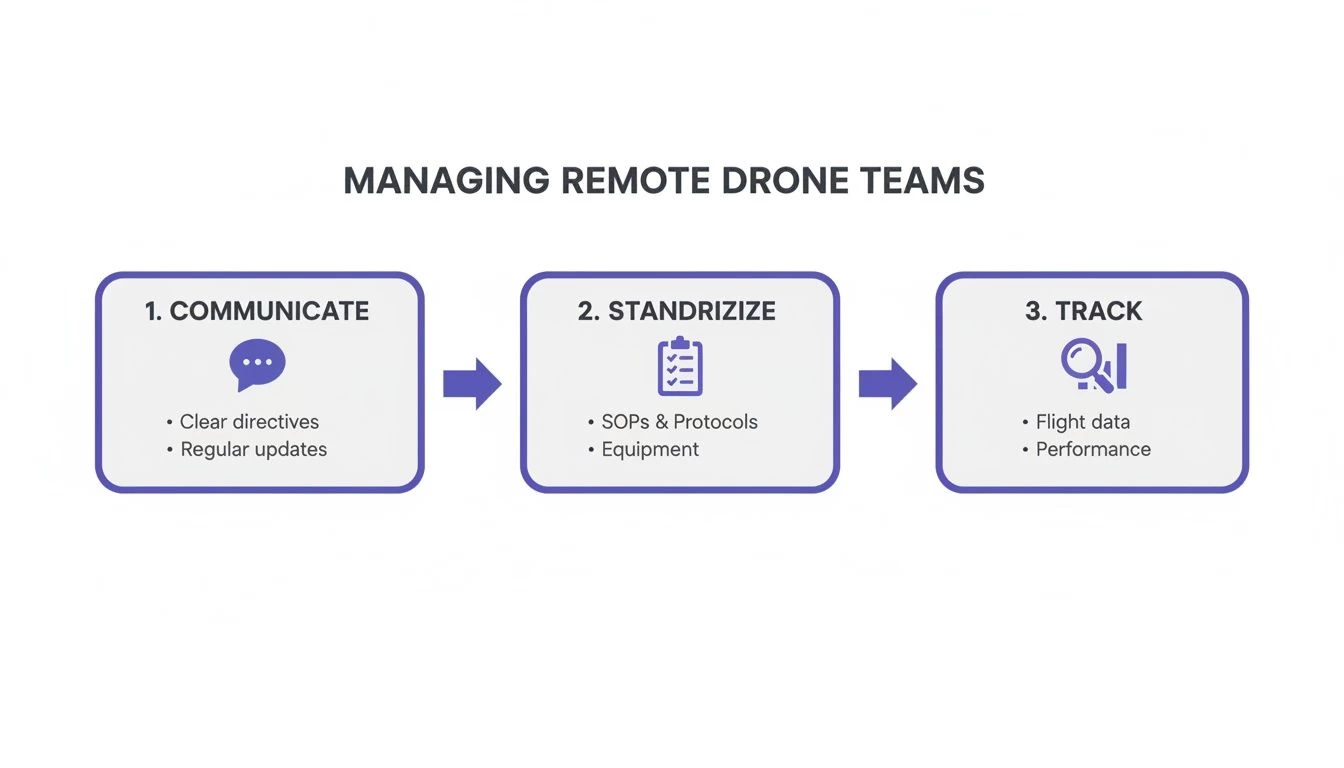
As you can see, it's a continuous cycle. Clear communication makes standardized procedures possible. Those standardized procedures then generate the data you need to track and improve performance. A platform like Dronedesk is built around this exact loop, bringing these functions together in one seamless dashboard.
For a deeper dive into centralizing your hardware, our guide on UAV fleet management is a great next step.
I’ve learned one thing over and over again when managing distributed teams: autonomy requires alignment. Giving your pilots the freedom to operate remotely only works when they are perfectly aligned with company standards and mission objectives. Centralized tools provide that alignment.
Building Your Remote Communication System
When your pilots are spread out across different sites, your communication system isn't just a nice-to-have; it's the central nervous system of your entire operation. Without the usual face-to-face check-ins, information gets lost, fragmented, or just plain misinterpreted. This is how you end up with dangerous information silos, where one pilot has different instructions than another, putting both mission safety and client satisfaction at risk.
Trying to manage things with a messy mix of texts for urgent stuff, emails for documents, and a separate app for general chat is a recipe for chaos. The real key is building a single, unified ecosystem where every conversation has a designated home. This creates one source of truth that every team member can rely on, whether they're on-site or coordinating from HQ.
Set Clear Communication Expectations
Once your channels are set up, you need to define the rules of engagement. Without clear guidelines, you'll have pilots waiting hours for a critical answer or, on the flip side, managers feeling pressured to be available 24/7. Ambiguity is the absolute enemy of efficient remote work.
My rule of thumb is simple: clarity over convenience. It might feel convenient to send a quick text, but it's far clearer and safer to log that communication in the designated project channel where it can be audited and referenced later.
To head off any confusion, create and document a clear communication protocol. This document should spell out expectations for response times based on urgency. For example, a mission-critical issue might require a response within 15 minutes, while a general question can wait a few hours.
Documenting these norms removes guesswork and cuts down on anxiety. Pilots know when to expect a response, and managers can actually disconnect after hours, confident that a proper escalation path is in place for true emergencies.
Standardize Briefings and Debriefings
For any professional drone operation, pre-flight briefings are non-negotiable. In a remote setup, you can't just have a casual chat by the van. You need a standardized, repeatable format for virtual briefings to guarantee nothing gets missed.
I've found a combination of synchronous and asynchronous methods works best:
- Asynchronous Prep: Start by attaching all key documents—flight plans, risk assessments (RAMS), and site maps—directly to the job file in Dronedesk. This allows pilots to review all the core information on their own time before the mission.
- Synchronous Briefing: Schedule a mandatory, short video call about 30 minutes before the mission kicks off. Use this time to run through the day's objectives, confirm Go/No-Go conditions, and field any last-minute questions.
- Asynchronous Debrief: After the flight is complete, pilots must complete a standardized post-flight report and log all data within the platform. This creates a consistent, auditable record of every mission's outcome.
This blended approach ensures detailed information is shared efficiently while still providing that crucial real-time interaction to confirm everyone is on the same page and ready to fly. As you build out your tech stack with these communication tools, you may find our article on essential business tools for drone companies a helpful resource for finding other great software.
Standardizing Your Operations for Remote Work
While good communication keeps your team connected, it's standardization that keeps them safe. In the world of drone operations, consistency isn't just about being efficient—it's the bedrock of a compliant, secure business.
When your pilots are spread out across multiple sites, you simply can’t afford to have them doing things differently. You need to know that pre-flight checks, risk assessments, and equipment maintenance are handled the exact same way, every time. The goal is to stamp out any guesswork and make the "right way" the only way to get a job done. This is non-negotiable for managing remote teams in a high-stakes field like ours.
Build Your Digital SOPs and Checklists
Let's be honest: paper binders full of Standard Operating Procedures (SOPs) gathering dust in a pilot’s vehicle are useless for a remote team. Your SOPs need to be digital, always accessible, and baked directly into the daily workflow. This means turning static documents into active, mandatory checklists within your management software.
A great place to start is by digitizing your most critical safety routines. For instance, Dronedesk lets you build custom checklists that pilots complete before and after flights. It’s a great way to help drive process compliance.
Here are the key checklists to get digitized right away:
- Pre-Flight Inspections: A step-by-step confirmation that the aircraft, batteries, and all gear are in perfect working order.
- On-Site Risk Assessments: A dynamic list of potential hazards a pilot has to acknowledge and mitigate before taking off.
- Post-Flight Data Logging: A required process for uploading flight logs and imagery, and noting any equipment issues from the mission.
- Equipment Maintenance Schedules: A recurring checklist for routine service, making sure no drone flies past its maintenance due date.
By embedding these checklists into the job workflow, you create an unbreakable chain of compliance. For a manager, this offers complete peace of mind, knowing that essential safety steps weren't just remembered—they were verifiably completed.
Create a Robust Digital Onboarding Process
How you bring new pilots into the fold sets the tone for their entire time with you. A standardized digital onboarding process ensures every new hire is fully aligned with your safety culture before their first paid mission. It’s far more effective than just shooting over a welcome email with a stack of PDFs.
Your onboarding should be a clear, structured pathway and include all the necessary documents, training videos, and quizzes they need to work through.
A well-structured onboarding process is your first and best opportunity to embed your company's safety DNA into a new team member. It demonstrates that for your operation, compliance isn't optional—it's foundational.
This isn't just about rules; it's about engagement. Gallup's 2024 research shows that 29% of fully remote workers feel engaged at work, which actually beats the 20% engagement rate for on-site employees. When you invest in a clear, supportive onboarding experience, you're not just improving safety—you're creating an environment where skilled pilots want to stick around. You can dig into more insights on this in Gable's comprehensive report on remote work.
Enforce Compliance on Every Single Mission
Standardization really shines when it’s applied to every single job, without exception. The best way to make this happen is by linking compliance documents directly to individual mission files. A generic risk assessment is good, but a site-specific one is infinitely better.
Think about it: a roof inspection in a busy city center needs more than a standard pre-flight checklist. The pilot needs instant access to local flight restrictions, potential signal interference spots, and public safety plans.
With a platform like Dronedesk, you can include Risk Assessment Method Statements (RAMS) and other critical docs right in the job file. When the pilot opens the job on their phone or tablet, all the site-specific information is right there. This system ensures every pilot is working from the same compliant playbook, tailored to the unique demands of each mission. This is how you turn theory into practice, making your SOPs living documents that actively protect your pilots, your clients, and your business.
Mastering Remote Scheduling and Asset Tracking
Let's be honest, juggling pilots, drones, and batteries across different locations can feel like a logistical nightmare. If you're figuring out how to manage a remote team, this is often the biggest headache. The secret is to stop scrambling and start using smart, proactive scheduling and tracking.
This is where a central system takes your operation from a confusing puzzle to a well-oiled machine. Without one, you're stuck relying on memory, messy spreadsheets, and a constant stream of frantic phone calls to figure out who's available, who's qualified, and which drone is actually ready to fly. That approach just doesn't scale. It actively hurts your bottom line through pure inefficiency and missed jobs.
Dynamic Scheduling That Actually Works
The old way of doing things—a static calendar and a lot of manual cross-referencing—is dead. A pilot calls in sick? You have to start over. An urgent job lands on your desk? You waste an hour just trying to find who’s closest. Modern remote teams need a much more dynamic approach.
Think of your schedule not as a fixed document, but as a living, breathing dashboard. With a platform like Dronedesk, you can view a job calendar for truly intelligent assignments.
- Job Schedules: See all your jobs at a glance to help avoid any double-booking.
- Qualifications: View all your pilots' certifications so you know who is qualified, avoiding the risk of sending the wrong person to a job.
- Proximity to Site: When a last-minute inspection request comes in, you can view your pilots on a map and assign the job to the nearest available operator, saving you a fortune in travel time and fuel costs.
This multi-factor approach means that when a client calls with an urgent request, your process is calm and methodical. You can confidently confirm you can handle the job in minutes, not hours, because all the information you need is right there in front of you.
The Critical Role of Real-Time Fleet Tracking
Your drones, batteries, and sensors are your most valuable assets. But for so many remote teams, tracking them is an afterthought. That's a huge risk. Knowing exactly where your equipment is becomes even more vital when your team is spread out. For managing remote drone teams, mastering asset tracking is non-negotiable; implementing effective GPS tracking solutions for remote assets can give you the real-time location and operational data you need.
Imagine a drone is due for its 100-hour service. Without a centralized tracking system, it's dangerously easy for that maintenance to get missed. That puts you at risk of equipment failure and non-compliance. A proper fleet management dashboard gives you a single source of truth for every single piece of gear.
A drone sitting on a shelf uncharged or a battery pack that has gone missing isn't just an inconvenience; it's lost revenue. Real-time asset tracking is about maximizing the ROI on every single piece of equipment you own.
Within a platform like Dronedesk, every asset has its own digital profile. You can log its entire history—from the purchase date and flight hours to every single maintenance check and repair. This detailed history is invaluable, both for keeping your gear operationally ready and for proving due diligence during an audit. You can find more strategies for this in our complete guide on asset tracking best practices.
Responding with True Operational Agility
Let’s walk through a real-world scenario to see how this all comes together. It’s 2 PM on a Tuesday, and a construction client calls with an emergency. A critical structural component has just arrived on-site, and they need an aerial progress report for stakeholders before the end of the day.
Without a System: You'd be scrambling. You'd call Pilot A (no answer), text Pilot B (already on a job), and email Pilot C (who is two hours away). You might have to turn down the high-value job entirely.
With a Centralized System:
- You open your team dashboard and see Pilot D is just finishing a job 15 miles away.
- You check their qualifications—perfect, they're certified for the type of survey needed.
- You glance at the fleet tracker and see they have a drone with a fully charged set of batteries in their vehicle.
- You assign the new job to Pilot D, and the system automatically pushes all mission details, site maps, and risk assessments directly to their tablet.
The pilot gets a notification, accepts the job, and heads straight to the new site. The entire process takes less than five minutes. This is true operational agility—the ability to respond to opportunities instantly because your people and assets are perfectly organized.
This capability is becoming more vital than ever. Even with some companies pushing for a return to the office, 36% of new job postings now include a remote component. That trend, highlighted in Remotive's latest hiring statistics, shows that flexibility is a key competitive advantage, and having the right systems in place is what makes it possible.
Using Data to Drive Remote Team Performance
There's an old saying in business: if you can't measure it, you can't manage it. This is especially true when you’re figuring out how to manage a remote team effectively. Gut feelings and casual observations just don't cut it when your pilots are spread out across the country. To really get a handle on performance and make meaningful improvements, you have to lean on hard data.
This means moving beyond just looking at basic flight logs. You need to turn that raw data into actual insights that tell you how healthy and efficient your entire operation is. Taking a data-first approach gives you the objective proof you need to deliver fair feedback, spot hidden training gaps, and make smart decisions about where to take your business next.
Identify the KPIs That Truly Matter
First things first, stop tracking vanity metrics. Instead, focus on Key Performance Indicators (KPIs) that directly link to safety, efficiency, and your bottom line. Every operation is a little different, of course, but there are a few core metrics that every remote drone business should be watching like a hawk.
- Flight Hours Per Pilot: This is a simple but powerful way to check for a balanced workload. If one pilot is logging way more flight time than everyone else, they could be heading for burnout, while others might be underused.
- Mission Success Rate: What percentage of your planned missions are completed successfully, without any incidents or major issues? This is a great high-level indicator of your team's overall competence.
- Compliance Adherence Rate: How consistently are your pilots filling out mandatory pre-flight checklists and risk assessments? A 100% adherence rate here should be the non-negotiable standard.
- Average Job Profitability: When you connect flight data to your project costs and revenue, you can start to see which types of jobs are making you the most money and which pilots are the most efficient.
These KPIs give you a clear, objective lens to view team performance through. They take the guesswork out of management and allow you to have conversations based on facts, not just feelings.
From Raw Data to Insightful Reports
Collecting the data is only half the job. The real magic happens when you turn those numbers into easy-to-read reports that actually tell you a story. This is where having a centralized platform like Dronedesk becomes a game-changer.
Imagine you're getting ready for your quarterly business review. Instead of scrambling for days to pull numbers from a dozen different spreadsheets, you can generate a comprehensive report in just a few clicks.
Example Quarterly Performance Report
| Metric | Data Point | Insight | Action Item |
|---|---|---|---|
| Pilot Workload | Pilot A: 95 hrs; Pilot B: 40 hrs | Pilot A is nearing burnout risk. | Rebalance the upcoming schedule; check in with Pilot A. |
| Job Profitability | Roof Inspections: 65% Margin | This is our most profitable service. | Launch a targeted marketing campaign for this service. |
| Equipment Issues | Drone #3: 4 incidents in Q1 | This drone may have a recurring fault. | Ground Drone #3 for a full diagnostic and service. |
This kind of structured reporting turns a simple log of activities into a strategic business tool. It's not about micromanaging your pilots; it's about having a clear, top-down view of your operation's health so you can make informed adjustments.
Using Performance Data for Constructive Feedback
One of the toughest parts of managing a remote workforce is giving feedback that feels fair and objective. Data is your best friend here. The whole conversation changes when you can sit down (virtually) with a pilot and show them their specific metrics.
When you lead with data, feedback sessions shift from feeling like a critique to feeling like a coaching session. The focus moves from "what you did wrong" to "how can we improve this number together."
For example, if you notice a pilot's on-site time is consistently longer than average for similar jobs, you can dig into the why. You might discover they need a bit more training on a specific piece of software, or maybe there's a recurring issue with their equipment. Without the data, you’d never know where to even start looking.
This data-driven approach also has a big impact on overall productivity. Research shows that well-organized hybrid and remote teams can be about 5% more productive than their in-office counterparts. For a drone company, that 5% boost translates directly into more completed jobs and a smoother operation. As Achievers' analysis of remote work trends highlights, the key is being "well-organized." By using data to balance workloads and pinpoint inefficiencies, you are actively building that high-performing structure.
Got Questions? Let's Talk Specifics
Even with a great game plan, you're bound to run into some specific challenges when you first start managing a remote drone team. It's just part of the process. I've pulled together some of the most common questions I hear from managers, along with some straightforward, real-world advice to back up the strategies we've just covered.
How Do I Really Know My Remote Team is Being Safe and Compliant?
This is a big one, and it all comes down to standardizing your workflows so there's no room for error. Forget paper checklists or relying on a pilot's memory. The only way to guarantee safety is to make it a non-negotiable part of the process.
You can also include RAMS (Risk Assessment Method Statements) and other critical safety docs directly to each job file. This means every pilot has the exact, site-specific information they need, right in their hand. This centralized approach creates a bulletproof, auditable record of every single flight, giving you total oversight, even from hundreds of miles away.
What's the Best Way to Monitor Pilot Performance Without Micromanaging?
Nobody wants to feel like they're being watched over their shoulder, especially skilled professionals. The key is to lean on transparent data, not invasive digital surveillance.
Your operations platform is your best friend here. Use it to track key metrics like:
- Total flight hours
- Number of missions completed
- On-time completion rates
Dronedesk's reporting features are great for this, letting you visualize the data at a glance. You can quickly see who might be swamped and who has the bandwidth to take on more. This objective data gives you a fair and unbiased foundation for performance reviews and helps you balance the workload intelligently.
Just remember to pair this quantitative data with qualitative feedback. Regular one-on-one video calls are crucial for understanding the story behind the numbers and checking in on your team's well-being.
A bit of personal advice: always frame these data-driven chats around support, not scrutiny. The conversation should be something like, "Hey, I noticed your on-site time is a bit higher for these types of jobs. Is there anything we can do to help? Better gear, maybe some extra training?" This approach builds trust and actually solves problems instead of just pointing them out.
How Can I Build a Strong Team Culture When We're Never in the Same Room?
Building a genuine remote culture takes deliberate, consistent effort—it won’t happen by accident. You have to create the spaces for connection that would normally happen organically in an office.
A great place to start is with a 'digital water cooler'. This is just a dedicated chat channel (we use one in Slack) for non-work stuff where people can share photos, crack jokes, and just be human.
Also, make it a habit to start formal team meetings with a few minutes of casual catch-up. And celebrate wins publicly! When a pilot gets fantastic client feedback or nails a tricky mission, shout it from the rooftops in your main team channel. If you have the budget and your team is somewhat regional, occasional in-person meetups can be a massive morale booster.
These small, intentional actions are what make people feel like they're part of a tight-knit team, not just a list of names on a spreadsheet.
What Tools Are Must-Haves Besides a Drone Management Platform?
While a platform like Dronedesk should be the heart of your operation, you'll need a few other tools to complete your tech stack.
A rock-solid video conferencing tool like Zoom or Microsoft Teams is non-negotiable. It's essential for detailed pre-flight briefings, client calls, and those important team meetings.
You'll also want an instant messaging app like Slack for quick updates and for fostering that team camaraderie we just talked about.
Finally, don't overlook the basics. Ensure every pilot has reliable internet access, especially for uploading massive data files from the field. Your goal is to create a seamless tech ecosystem where your drone platform acts as the single source of truth for everything mission-critical.
Ready to take full control of your remote drone operations? Dronedesk gives you the power to manage your team, fleet, and jobs from one simple dashboard. Start your free trial today and see how easy it can be.
 How to Evaluate a Free Drone Logbook Before Using It →
 FAA Part 107 Test: How to Master Airspace Questions →
 Drone Risk Assessment Controls That Work in the Field →
 FAA Drone License Costs Beyond the Knowledge Test →
 Drone Part 107 Operations: When a Waiver May Be Needed →
 Drone Operating Rules for Managing Contractors and Employees →
 BVLOS Drone Requirements for Building a Safety Case →
 Drone Pilot Test Mistakes That Cost Candidates Marks →
 FAA 107 License vs Part 107 Certificate: What’s the Difference? →
 Drone Airport Rules: A Field Checklist for Site Assessments →