
How to Review a DJI Drone Flight Log Step by Step
A DJI drone flight log is more than a record of where the aircraft went. For professional operators, it is evidence of what happened, when it happened, what the aircraft reported, and how the remote pilot responded. Reviewed properly, it can help improve safety, support compliance, diagnose technical issues, and close the loop after a survey, inspection, emergency response or commercial filming job.
This guide walks through a practical, step-by-step process for reviewing a DJI drone flight log without getting lost in unnecessary data. It is written for operational use, so the focus is not just on opening a log, but on turning it into decisions your team can act on.
What is in a DJI drone flight log?
DJI flight logs vary by aircraft, app, controller, firmware version and whether you are using DJI Fly, DJI GO 4, DJI Pilot 2 or another DJI ecosystem tool. In general, a flight log can include location, altitude, speed, aircraft attitude, battery status, signal strength, flight mode changes, warnings, home point data, stick inputs and timestamps.
It is useful to distinguish between three types of records:
| Log type | What it is useful for | Typical limitation |
|---|---|---|
| In-app flight record | Quick operational review, playback, route checks, pilot debrief | May not expose all raw telemetry |
| Exported flight record file | Deeper analysis, incident review, archiving, third-party processing | File structure and availability vary by app and device |
| Aircraft internal data | Detailed technical diagnostics after serious events | Often harder to access and may require manufacturer support |
For routine operations, the in-app flight record is often enough. For incidents, near misses, unexplained warnings, flyaways or insurance matters, preserve the original exported files as well.
Before you start: decide why you are reviewing the log
A log review should have a clear purpose. Otherwise, it is easy to spend half an hour watching a playback without answering the question that matters.
Most DJI drone flight log reviews fall into one of these categories:
- Routine post-flight quality check: Confirm the flight matched the plan, the data capture was complete, and no warnings need follow-up.
- Compliance review: Check that the flight stayed within approved boundaries, altitude limits, airspace conditions and the operator’s procedures.
- Technical troubleshooting: Investigate battery behaviour, GPS dropouts, compass errors, gimbal issues, control link interruptions or unexpected flight modes.
- Incident investigation: Build a reliable timeline after a hard landing, collision, lost link, flyaway, privacy complaint or damage report.
- Performance improvement: Identify trends across pilots, aircraft, batteries, sites or mission types.
If the review relates to a reportable event, follow your operations manual, internal escalation process and applicable regulations. Do not edit, overwrite or casually share the original files.
Most of the answer is already in the log. Drop the
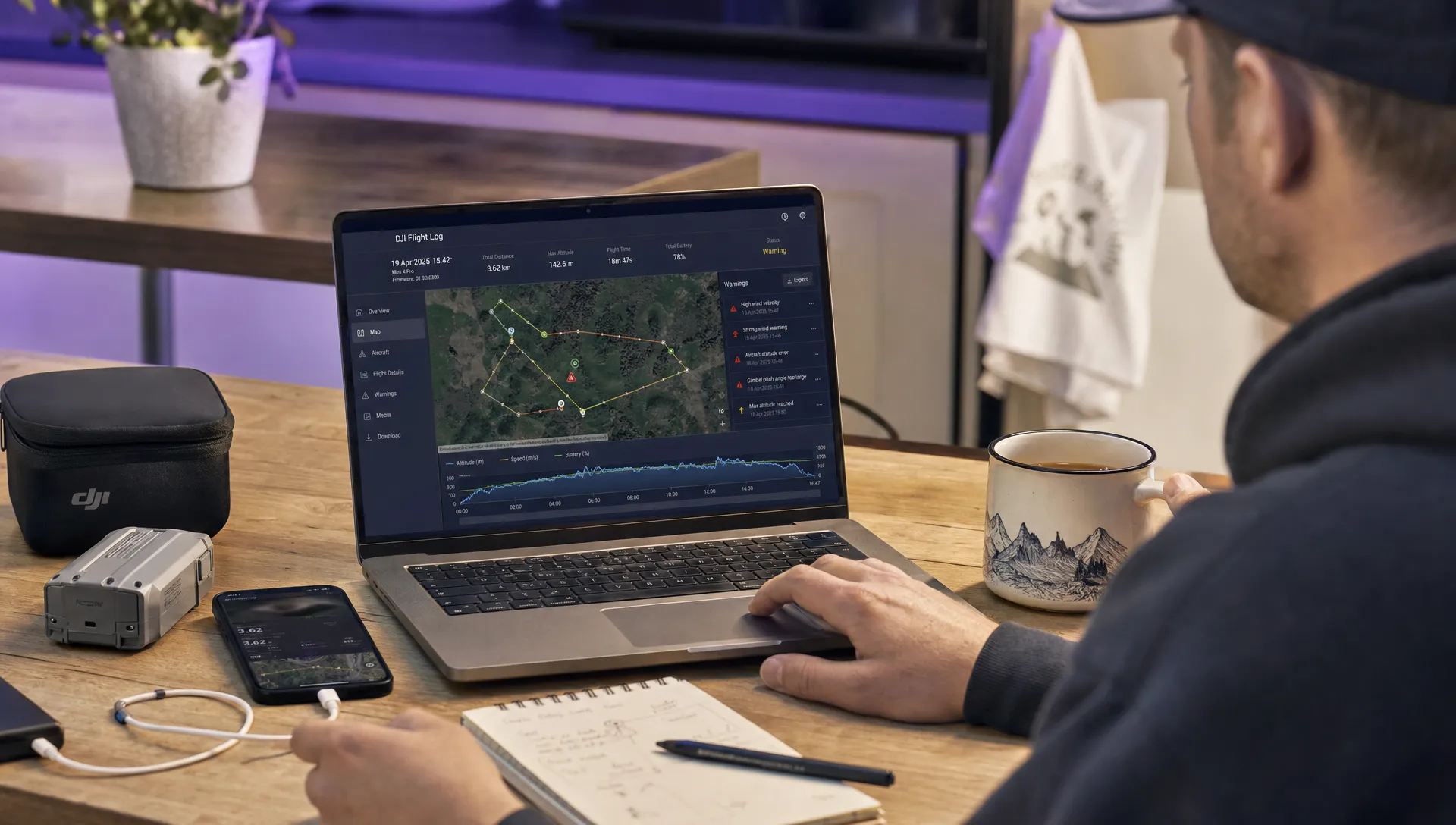
DJIFlightRecordfile into our Dronedesk DJI Log Viewer and you get voltage range, per-cell deviation, cycle count, temperature and peak current draw, alongside every warning the aircraft raised during the flight. Export it as a PDF report to attach to a claim or an occurrence report. Free, no account, and the log is not stored on our servers.
Step 1: Gather the right context before opening the log
A flight log only tells part of the story. Before reviewing it, collect the operational context so you can interpret the data properly.
At minimum, have these items to hand:
- Mission date, time and site name
- Aircraft model, serial number and firmware version if available
- Controller or mobile device used
- Remote pilot and any observers or crew
- Planned take-off and landing points
- Intended operating area and altitude limits
- Weather observations or forecasts used for the decision to fly
- Airspace permissions, landowner permissions or client constraints
- Pre-flight risk assessment and any dynamic risk assessment notes
- Battery IDs and payload configuration
This context matters. For example, a sudden pause in movement could be normal during a mapping mission, but suspicious during a linear utility inspection. A low signal warning might be expected behind a structure, but unacceptable if the pilot had planned to maintain a clear command and control path.
If your team is formalising this process, it helps to connect log reviews with the same operational controls used before take-off. Dronedesk’s guide on building a drone flight risk assessment that works is a useful companion because log review is where you confirm whether those controls actually held up in the field.
Step 2: Locate the correct DJI flight record
Start with the DJI app or controller used for the flight. The exact menu names change between DJI Fly, DJI GO 4, DJI Pilot 2 and enterprise controllers, but the usual workflow is to open the user profile, flight data centre or flight records section, then select the flight by date, time, location or aircraft.
Check that the record matches the job you are reviewing. Confirm the take-off location, flight duration, aircraft model and timeline. This sounds basic, but it is common for busy operators to have several similar flights on the same day, particularly during mapping, roof inspections or utility corridor work.
If you need the raw log file, export or copy it using the method supported by your device and DJI app. On some systems, you may be able to access flight record files from the mobile device or controller storage. On others, you may need to sync records or use DJI-supported export tools.
Preserve the original file. If you need to create a working copy, make a duplicate and label it clearly. For a professional review, a simple naming convention helps avoid confusion:
YYYY-MM-DD_Client_Site_Aircraft_Pilot_FlightNumber_Original
Do not rename the only copy of a raw log if that might compromise traceability. For incident reviews, also keep screenshots, app warnings, aircraft photos and any witness notes.
Step 3: Reconstruct the flight timeline
Now review the flight from take-off to landing. Your first pass should be broad, not forensic. The goal is to understand the sequence of events.
Look for the major milestones:
| Timeline point | What to confirm |
|---|---|
| Pre-take-off | Home point recorded, GPS status acceptable, aircraft status normal |
| Take-off | Aircraft climbs predictably, no early warnings, pilot maintains control |
| Transit | Route matches plan, altitude and speed are appropriate for the task |
| Work phase | Data capture area or inspection target is covered as intended |
| Warnings | Any system message is matched to location, pilot input and aircraft behaviour |
| Return phase | Battery margin, RTH behaviour and route back are acceptable |
| Landing | Landing point is controlled, no abnormal descent, tip-over or impact |
Most DJI playback tools allow you to scrub through the flight. Avoid jumping straight to the moment of interest. Many incidents are caused by a chain of smaller conditions that begin earlier, such as an incorrect home point, rushed take-off, marginal battery, weak GNSS reception or poor positioning relative to obstacles.
During this pass, write a short neutral summary. For example: “Aircraft took off at 10:04, climbed to operating altitude, completed two inspection passes, received intermittent weak signal warnings on the north side of the structure, initiated RTH at 32% battery, landed manually at 10:21.”
That kind of plain-language timeline is useful for clients, managers and safety reviews.
Step 4: Check the map track against the planned operation
Next, compare the actual flight path with the intended operating area. This is one of the most important parts of a DJI drone flight log review because it connects telemetry to operational control.
Check whether the aircraft remained within:
- The planned site boundary
- Visual line of sight expectations or authorised alternative procedures
- Agreed client work zones
- Any airspace permission limits
- Minimum distances or buffer zones in your procedures
- The altitude and geographic limits in the mission plan
Do not review the track in isolation. A slight deviation may be acceptable if it was a deliberate safety manoeuvre to avoid birds, people, vehicles, cranes, masts or emergency activity. Equally, a neat-looking flight line may still be problematic if it crossed a boundary the client or landowner had excluded.
For mapping and surveying work, check coverage as well as compliance. A flight can be legally uneventful but still operationally poor if turns were too wide, lines were missed, overlap was compromised or the pilot interrupted an automated mission without documenting why.
Step 5: Review altitude, speed and flight mode changes
Altitude and speed tell you whether the operation was flown in a controlled, proportionate way. Focus on trends rather than isolated spikes, but pay attention to anything that exceeds the plan or looks inconsistent with the task.
When reviewing altitude, remember that logs may show different references depending on the system, such as height relative to take-off point or altitude based on positioning data. For professional reporting, be precise about what the log actually displays.
Flight mode changes are especially important. Look for transitions such as normal positioning mode, sport mode, tripod/cine mode, ATTI-style behaviour on older platforms, automated mission mode, return-to-home or landing protection events. Unexpected mode changes can explain sudden changes in handling, braking, drift or pilot workload.
Ask these questions:
- Was the selected mode suitable for the task and environment?
- Did the aircraft enter RTH, low battery RTH or auto-landing as expected?
- Did the pilot cancel or override automation, and if so, was that justified?
- Were speed and descent rates appropriate near people, structures and obstacles?
- Did any altitude or distance values conflict with the risk assessment or permission conditions?
If the aircraft model matters to the analysis, check it against reliable specifications. For example, Dronedesk hosts technical data pages for common DJI aircraft, including the DJI Mavic 3 Pro specification datasheet, which can help when you are reviewing expected endurance, performance or payload context.
Step 6: Analyse battery behaviour, not just battery percentage
Battery percentage is easy to understand, but it is not the whole story. A serious review should consider how the battery behaved under load.
Look at the battery level over time and compare it with the mission profile. A rapid drop during aggressive manoeuvres, high wind, cold weather or heavy payload work may be explainable. A sudden voltage warning during ordinary flight deserves closer attention.
Key indicators include:
| Battery indicator | Why it matters | Possible concern |
|---|---|---|
| Battery percentage trend | Shows energy use throughout the flight | Unusually fast depletion |
| Voltage warnings | Indicates stress or low voltage under load | Increased risk of forced landing |
| Cell imbalance, where available | Shows whether cells are behaving consistently | Ageing, damaged or unsuitable battery |
| Temperature, where available | Affects output and reliability | Too cold, overheating or poor storage practice |
| RTH or landing triggers | Shows how the aircraft managed reserve energy | Late return, insufficient margin or pilot override |
Pay particular attention to the lowest battery point before landing and the distance from the landing area at that moment. For commercial work, “it landed safely” is not a complete answer. The better question is whether it landed with an appropriate reserve for the location, weather, aircraft and task.
Step 7: Investigate warnings and abnormal events in sequence
Warnings are often the most valuable part of the log, but they can be misleading if read out of order. A “weak signal” warning after the aircraft has already moved behind a building means something different from a weak signal warning in open terrain shortly after take-off.
Create a simple event sequence. Include the timestamp, warning text, aircraft location, altitude, distance from pilot, battery state, flight mode and pilot action. This allows you to separate cause, effect and response.
Common DJI warning categories include:
- GNSS or positioning issues
- Compass or IMU errors
- Obstacle sensing limitations
- Battery temperature, voltage or low power warnings
- Strong wind warnings
- Signal interference or disconnection
- Gimbal, camera or payload errors
- Return-to-home prompts and failsafe events
Do not assume that the first visible warning is the root cause. For example, strong wind can increase battery drain, which can then trigger an earlier return requirement, which can then create pressure on the pilot to take a more direct route home. The log review should capture that chain.
For significant incidents, avoid making unsupported conclusions. Use wording such as “the log indicates,” “the aircraft reported,” or “the recorded sequence is consistent with.” That is more defensible than overclaiming certainty from incomplete data.
Step 8: Review control link, signal and pilot inputs
Command and control reliability is central to safe drone operations. In the log, check whether signal warnings align with aircraft position, antenna orientation, terrain, buildings, trees, masts or other potential sources of interference.
A single brief warning may be low risk if the aircraft remained stable, the pilot reacted correctly and the mission environment was controlled. Repeated warnings, long disconnects or signal loss during critical phases of flight need deeper investigation.
Pilot inputs can also be useful. They show whether the aircraft was responding to commands, whether the pilot was making smooth corrections, and whether abrupt movements were commanded or uncommanded. This is particularly important after a collision, hard landing or complaint about erratic flying.
When reviewing pilot inputs, avoid turning the process into blame-finding. The aim is to understand what the operator, aircraft and environment were doing as a system. If a pilot made a poor input, ask why. Was the display hard to see? Was the observer overloaded? Was the mission plan too tight? Was the aircraft too close to an obstacle? Good log reviews improve procedures, not just individual performance.
Step 9: Check positioning, home point and return-to-home settings
Many serious drone incidents involve an incorrect assumption about where the drone will go if something goes wrong. That makes home point and return-to-home behaviour a key part of any DJI drone flight log review.
Confirm whether the home point was recorded before take-off and whether it was appropriate. On moving platform operations, multi-location jobs or complex sites, this deserves extra care. Also check the RTH altitude against surrounding obstacles such as trees, cranes, buildings, towers and terrain.
Review any RTH events in detail:
| RTH element | Review question |
|---|---|
| Trigger | Was RTH initiated by the pilot, low battery, signal loss or another condition? |
| Altitude | Was the selected RTH altitude suitable for known obstacles? |
| Route | Did the aircraft return directly, retrace a route or behave according to model settings? |
| Pilot action | Did the pilot allow, cancel or modify RTH? |
| Outcome | Did the aircraft land safely with sufficient reserve? |
If the pilot cancelled RTH, do not treat that as automatically wrong. It may have been safer to fly manually. But the reason should be clear from the context and, for professional operations, documented in the post-flight notes.
Step 10: Confirm the payload and data capture outcome
For survey companies, utility operators and emergency services, the flight is only successful if the required data was captured safely and usefully. The DJI flight log can help explain gaps in imagery, missing inspection angles, inconsistent coverage or mission interruptions.
Compare the log with the deliverable. For mapping, check whether the grid or corridor was completed and whether any pauses, altitude changes or manual interventions affected overlap. For inspections, compare the aircraft position and gimbal behaviour with the assets being inspected. For emergency response, check whether the aircraft maintained useful observation positions and whether battery changes or repositioning created gaps in coverage.
This step is especially valuable when reviewing recurring issues. If one site repeatedly produces incomplete datasets, the problem might not be the pilot. It could be take-off location, terrain, wind exposure, permission boundaries, radio interference or unrealistic mission design.
If your organisation manages multiple aircraft, pilots and clients, this is where a proper operational system becomes more useful than isolated files. Dronedesk includes flight logging, fleet management, team management, client management, flight planning, configurable checklists, risk assessments, airspace intelligence, proximity intelligence and data reporting, as described on the Dronedesk features page. Those functions help operators keep the operational picture connected rather than scattered across apps, spreadsheets and folders.
Step 11: Compare the log with your risk assessment and procedures
A flight log review should close the safety loop. The question is not only “what happened?” It is also “did our planning assumptions hold up?”
Compare the actual flight with the controls in your risk assessment. If the plan said the observer would monitor a public footpath, did the flight path and timeline show the aircraft operating near that area for longer than expected? If the plan required a specific take-off location to maintain separation from vehicles, did the pilot use it? If the risk assessment assumed benign wind, did the log show strong wind warnings or unusually high battery consumption?
This is where post-flight review can improve future jobs. You may discover that a site needs a different take-off area, a lower workload per battery, additional crew, a revised emergency landing area, different communications, or a stricter go/no-go threshold.
For growing teams, the same logic applies at fleet level. Individual logs reveal individual events, but patterns across logs reveal management issues. If you are moving beyond spreadsheets, Dronedesk’s drone fleet management guide explains how fleet oversight changes as operations scale.
Step 12: Document findings and assign actions
The final step is to turn the review into a usable record. A good flight log review should be short enough to read, but specific enough to support decisions later.
A practical review note should include:
- Flight reviewed and log source
- Reason for review
- Summary timeline
- Key warnings or abnormal events
- Battery and signal observations
- Any deviations from the plan or risk assessment
- Data capture outcome
- Root cause or likely contributing factors, if known
- Corrective actions and owner
- Whether the issue is closed or needs escalation
For routine flights, this may be a brief post-flight note. For incidents, it may become part of a formal safety report. In either case, avoid vague conclusions such as “pilot error” or “drone malfunction” unless the evidence genuinely supports them. More useful wording is specific: “RTH altitude was lower than nearby tree line,” “battery reserve was insufficient for the return distance in observed wind,” or “weak signal warnings occurred when the aircraft was positioned behind the warehouse relative to the pilot.”
Common mistakes when reviewing DJI flight logs
Even experienced operators can misread logs. The most common mistakes are rushing to a conclusion, treating a single warning as the whole explanation, or reviewing telemetry without operational context.
Another common problem is focusing only on the aircraft. DJI logs can show what the drone did, but they do not automatically explain site pressure, client instructions, pilot workload, observer performance, weather judgement or planning quality. Those human and organisational factors are often where the most useful improvements are found.
Be careful with third-party converters and log viewers as well. They can be extremely useful, but check how they interpret DJI data fields and whether they support your specific aircraft and app version. If the matter is serious, retain the original DJI records and record which tools were used for analysis.
A simple DJI drone flight log review checklist
Use this checklist as a quick operational structure:
| Review area | Pass/fail question |
|---|---|
| Correct record | Does the log match the aircraft, pilot, date, site and mission? |
| Timeline | Can you explain the flight from take-off to landing? |
| Flight path | Did the aircraft remain within planned and authorised limits? |
| Altitude and speed | Were values appropriate for the task and environment? |
| Battery | Was there adequate margin and normal behaviour under load? |
| Warnings | Were alerts understood, sequenced and actioned? |
| Signal | Was command and control maintained acceptably? |
| RTH and home point | Were failsafe settings suitable and correctly triggered? |
| Data capture | Was the operational objective completed? |
| Follow-up | Are findings documented and actions assigned? |
Frequently Asked Questions
Where do I find a DJI drone flight log? Start in the DJI app or controller used for the flight, usually under a profile, flight data centre or flight records area. The exact location depends on whether you use DJI Fly, DJI GO 4, DJI Pilot 2 or another DJI tool.
Can I review a DJI flight log without exporting the raw file? Yes, for routine checks the in-app playback may be enough. For incidents, technical issues, insurance matters or formal investigations, preserve the original exported records where available.
What is the most important thing to check in a DJI flight log? There is no single field that tells the whole story. Start with the timeline, then compare the flight path, altitude, battery, warnings, signal and pilot actions against the mission plan and risk assessment.
Can a DJI drone flight log prove exactly what caused an incident? Sometimes it can strongly indicate a cause, but logs may not capture every environmental or human factor. Treat the log as evidence, not the entire investigation.
How long should professional operators keep DJI flight logs? Follow your operations manual, client requirements, insurance conditions and applicable regulatory obligations. Many operators keep logs as part of their wider flight and maintenance records because they support safety, traceability and performance review.
Make flight log reviews part of a safer operating system
Reviewing a DJI drone flight log is most valuable when it feeds back into better planning, better risk controls and better fleet decisions. If the review ends as a forgotten file on a controller, the learning is easily lost.
Dronedesk helps drone operators manage flight planning, flight logging, risk assessments, configurable checklists, fleet records, team information, client details, airspace intelligence, proximity intelligence and data reporting in one web platform. If you want a cleaner way to connect what was planned, what was flown and what needs improving, visit Dronedesk and see how it can support your drone operations workflow.
 FAA Part 107 Record-Keeping Rules for Commercial Teams →
 How to Review a DJI Flight Log After an Unexpected Event →
 Drone Laws Around the World: A Pre-Flight Research Framework →
 How to Compare Drone Survey Services for Complex Sites →
 How to Start a Drone Mapping Business With a Clear Workflow →
 Class C Airspace Drone Rules for Commercial Flights →
 How to Create a Drone Job Pack for Every Mission →
 FAA Small UAS Rule: Key Requirements for Operators →
 How to Build a Drone Pilot Flight Log That Is Audit Ready →
 FAA Drone Licence Requirements for Commercial Pilots →